第353篇:现网性能瓶颈分析与带宽扩容建议
关键词:性能瓶颈、带宽扩容、流量分析、NetStream、容量规划
一、案例背景
某在线教育平台在疫情期间用户量暴增3倍,网络出现明显性能瓶颈。高峰期视频播放卡顿率从2%上升至15%,部分用户无法加载课程内容。IT团队需要在不中断业务的前提下,完成性能瓶颈分析和扩容方案制定。
网络概况: - CDN出口带宽:200Gbps(中国电信)+ 100Gbps(中国联通) - 数据中心出口:40Gbps - 应用服务器:200台(视频转码、API服务) - 日活用户:从50万增至150万
瓶颈表现: 1. CDN出口带宽利用率持续超过90% 2. 数据中心内部东西向流量拥塞 3. API服务器响应时延从50ms增至500ms 4. 数据库连接池频繁耗尽
二、需求分析与方案设计
2.1 性能瓶颈分析方法
| 方法 | 工具 | 适用场景 |
|---|---|---|
| NetStream分析 | 交换机NetStream | 流量分布、Top Talkers |
| SNMP监控 | Zabbix/Prometheus | 链路利用率趋势 |
| 主动探测 | Ping/Traceroute/iPerf | 端到端时延和带宽 |
| 应用性能监控 | APM工具 | 应用层性能 |
| 抓包分析 | Wireshark/tcpdump | 协议级分析 |
2.2 瓶颈定位流程
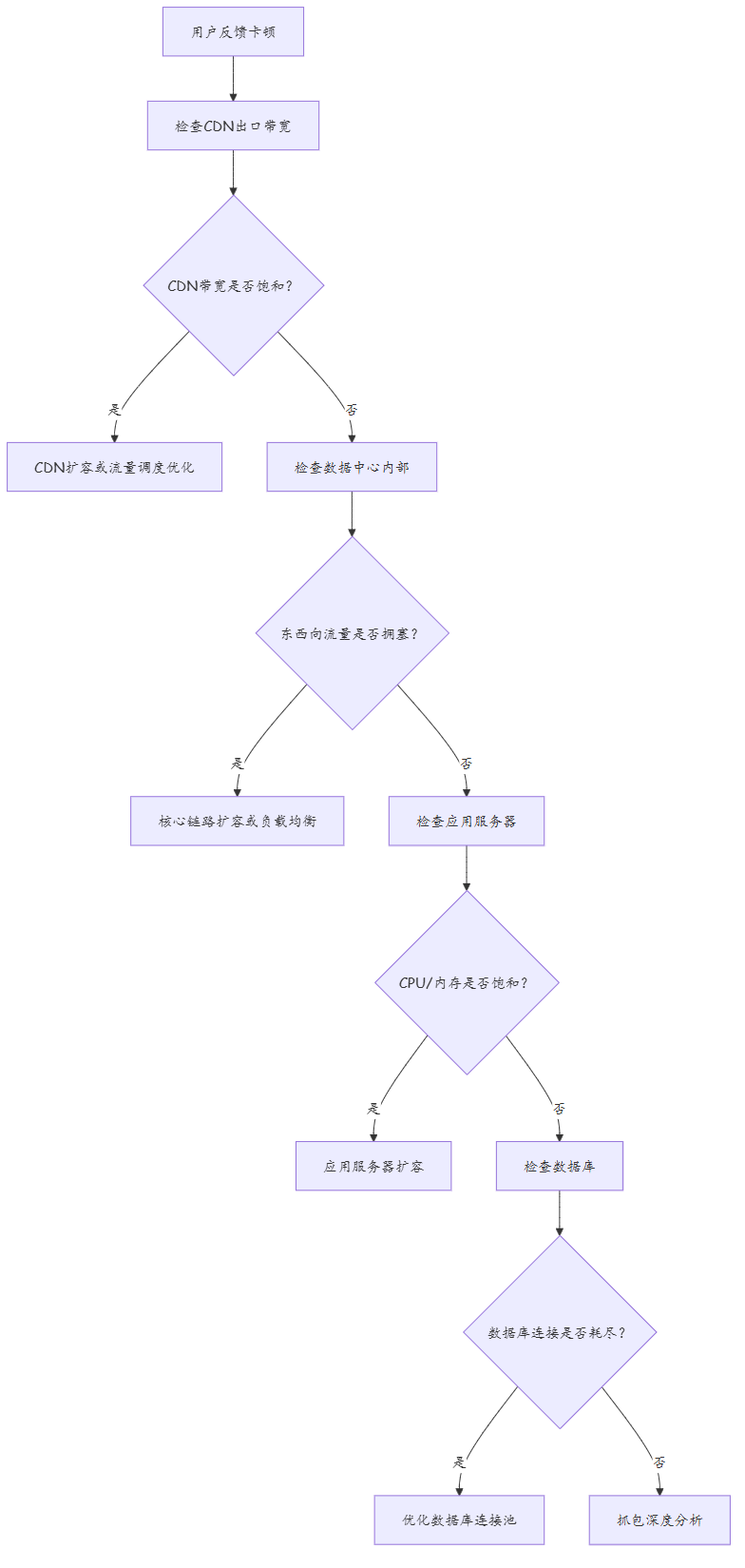
2.3 容量规划模型
| 指标 | 当前值 | 峰值 | 规划值(3年) | 增长系数 |
|---|---|---|---|---|
| CDN出口带宽 | 300Gbps | 280Gbps | 1Tbps | 3.3x |
| 数据中心互联 | 40Gbps | 35Gbps | 200Gbps | 5x |
| 接入端口数 | 1600 | 1500 | 4800 | 3x |
| 并发用户数 | 150万 | 140万 | 500万 | 3.3x |
2.4 性能瓶颈分类模型
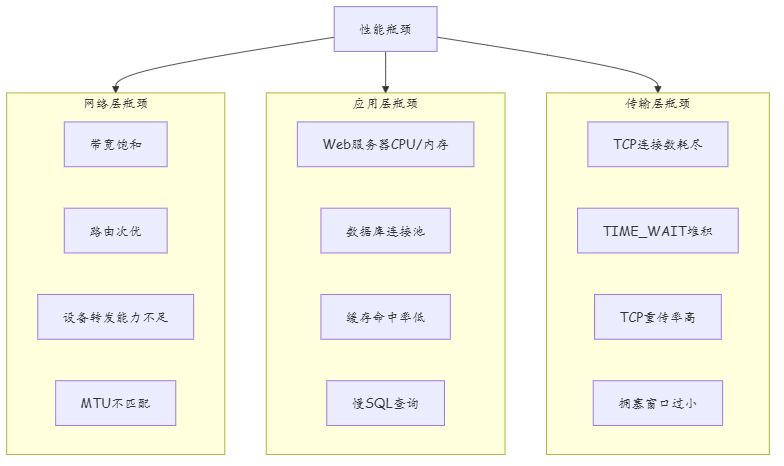
定位口诀:从外向内逐层排查,先网络后传输再应用。
三、技术细节与实施过程
3.1 NetStream流量分析
# 配置NetStream采集(采集器+导出器)
[Huawei] netstream
[Huawei-netstream] collector 1
[Huawei-netstream-collector-1] address 10.100.1.100 udp-port 9996 version v9
[Huawei-netstream-collector-1] quit
[Huawei-netstream] quit

[Huawei] interface 100GE 1/0/1
[Huawei-100GE1/0/1] netstream outbound collector 1
[Huawei-100GE1/0/1] netstream inbound collector 1
[Huawei-100GE1/0/1] quit

# 查看Top源/目的IP
<CE6865> display netstream statistics source-ip top 10
Rank  Source IP        Packets       Bytes         Protocol
1     10.10.1.50       45,678,901    3,456,789,012 TCP      <-- 视频服务器
2     10.10.1.51       38,901,234    2,890,123,456 TCP
3     10.10.1.52       32,456,789    2,345,678,901 TCP
4     10.10.2.10       25,678,901    1,890,123,456 TCP      <-- API服务器
5     10.10.2.11       21,234,567    1,567,890,123 TCP

# 查看Top目的IP
<CE6865> display netstream statistics destination-ip top 10
Rank  Destination IP   Packets       Bytes         Protocol
1     203.0.113.50     35,678,901    2,678,901,234 TCP      <-- CDN节点
2     203.0.113.51     28,901,234    2,123,456,789 TCP
3     10.10.3.100      15,678,901    1,234,567,890 TCP      <-- 数据库

# 查看Top流
<CE6865> display netstream statistics flow top 5
Source IP        Dest IP          Proto  Packets      Bytes
10.10.1.50       203.0.113.50     TCP    12,345,678   987,654,321
10.10.1.51       203.0.113.50     TCP    10,234,567   876,543,210
分析结论: 1. 前3台视频服务器贡献了60%的出口流量 2. 主要流量流向CDN节点(视频分发) 3. 数据库访问流量占比约15%
3.2 带宽利用率趋势分析
# 通过SNMP采集的带宽利用率数据(Prometheus查询)
# 查询过去7天的CDN出口带宽利用率
max_over_time(telemetry_if_in_octets{device="cdn-export", interval="1s"}[7d])

# 分析结果:
# 周一到周五 10:00-22:00 利用率 > 85%
# 周末 利用率 > 70%
# 峰值时刻 利用率 > 95%(丢包发生)
3.3 内部东西向流量分析
# 数据中心内部流量矩阵
# Source\Dest       Server-A    Server-B    Server-C    Storage
# Server-A          -           15Gbps      8Gbps       5Gbps
# Server-B          12Gbps      -           6Gbps       3Gbps
# Server-C          5Gbps       4Gbps       -           2Gbps

# 核心交换机端口利用率
<CE6865> display interface description
100GE1/0/1  up    up    utilization: 88%  <-- Server-A上联
100GE1/0/2  up    up    utilization: 82%  <-- Server-B上联
100GE1/0/3  up    up    utilization: 75%  <-- Server-C上联
100GE1/0/4  up    up    utilization: 45%  <-- Storage上联
分析结论: 1. 东西向流量(服务器间)占内部流量的70% 2. Server-A和Server-B之间的流量最大(双向27Gbps) 3. 核心交换机上行端口利用率过高
3.4 主动探测测试(iPerf)
iPerf用于测量两点间的最大带宽和时延抖动,帮助验证扩容效果。
# 在目的端启动iPerf Server(UDP模式)
$ iperf3 -s -u -B 0.0.0.0

# 在源端执行iPerf Client测试(模拟视频流带宽需求)
$ iperf3 -c 10.10.1.50 -u -b 20G -t 60 -l 1400
Connecting to host 10.10.1.50, port 5201
[  5]   0.00-10.00  sec  23.1 GBytes  19.8 Gbits/sec  156  1200 bytes
[  5]  10.00-20.00  sec  22.8 GBytes  19.5 Gbits/sec  143  1200 bytes
[  5]  20.00-30.00  sec  23.0 GBytes  19.7 Gbits/sec  162  1200 bytes
[ ID] Interval       Transfer     Bitrate     Retr    Jitter   Lost/Total
[  5]   0.00-60.00  sec  137 GBytes  19.7 Gbits/sec  461   0.4ms  0.01%

# TCP模式测试最大吞吐量
$ iperf3 -c 10.10.1.50 -t 60 -P 4
[  4]   0.00-60.00  sec  562 GBytes  80.0 Gbits/sec
[  5]   0.00-60.00  sec  558 GBytes  79.5 Gbits/sec
[  6]   0.00-60.00  sec  561 GBytes  79.7 Gbits/sec
[  7]   0.00-60.00  sec  559 GBytes  79.5 Gbits/sec
[ SUM]   0.00-60.00  sec  2.25 TBytes  319 Gbits/sec
iPerf参数说明:
| 参数 | 说明 | 本例取值 |
|---|---|---|
-u |
UDP模式 | 模拟视频流 |
-b |
指定发送带宽 | 20Gbps |
-t |
测试时长 | 60秒 |
-P |
并行流数 | 4(TCP模式) |
-l |
数据包长度 | 1400字节(匹配MTU) |
-R |
反向测试 | 上行带宽 |
3.5 TCP连接状态分析
# 查看TCP连接状态分布
<CE6865> display tcp connection statistics
TCP Connection Statistics:
  ESTABLISHED:  125,432
  TIME_WAIT:    45,678     <-- TIME_WAIT过多,占36%
  CLOSE_WAIT:   2,345
  SYN_SENT:     567
  SYN_RECV:     123

# TIME_WAIT过多说明短连接频繁创建和销毁
# 解决方案:启用TCP连接复用、调整TIME_WAIT超时时间

# 调整TCP参数(服务器侧)
net.ipv4.tcp_tw_reuse = 1           # 允许复用TIME_WAIT socket
net.ipv4.tcp_fin_timeout = 30       # FIN等待时间从60s降至30s
net.ipv4.tcp_max_tw_buckets = 200000 # 增大TIME_WAIT bucket数
四、实战配置/案例分析
4.1 带宽扩容方案
| 方案 | 扩容内容 | 成本 | 实施周期 | 推荐度 |
|---|---|---|---|---|
| 方案A | CDN出口翻倍(300G→600G) | 高 | 2周 | ★★ |
| 方案B | 多CDN调度(引入第三家CDN) | 中 | 1周 | ★★★ |
| 方案C | 核心链路40G→100G | 中 | 1周 | ★★★ |
| 方案D | 流量整形+缓存优化 | 低 | 3天 | ★★★★ |
| 方案E | 综合方案(B+C+D) | 中高 | 2周 | ★★★★★ |
推荐方案E实施:
# 步骤1:流量整形配置(限制非关键流量)
[Huawei] traffic classifier VIDEO
[Huawei-classifier-VIDEO] if-match dscp ef
[Huawei-classifier-VIDEO] quit

[Huawei] traffic classifier API
[Huawei-classifier-API] if-match dscp af31
[Huawei-classifier-API] quit

[Huawei] traffic classifier OTHER
[Huawei-classifier-OTHER] if-match dscp default
[Huawei-classifier-OTHER] quit

[Huawei] traffic behavior VIDEO_PRI
[Huawei-behavior-VIDEO_PRI] queue wfq weight 8
[Huawei-behavior-VIDEO_PRI] car cir 20000000  # 视频20Gbps保证带宽
[Huawei-behavior-VIDEO_PRI] quit

[Huawei] traffic behavior API_PRI
[Huawei-behavior-API_PRI] queue wfq weight 4
[Huawei-behavior-API_PRI] car cir 5000000    # API 5Gbps保证带宽
[Huawei-behavior-API_PRI] quit

[Huawei] traffic behavior OTHER_PRI
[Huawei-behavior-OTHER_PRI] queue wfq weight 1
[Huawei-behavior-OTHER_PRI] car cir 2000000  # 其他2Gbps,超限额丢弃
[Huawei-behavior-OTHER_PRI] quit

[Huawei] traffic policy VIDEO_POLICY
[Huawei-policy-VIDEO_POLICY] classifier VIDEO behavior VIDEO_PRI
[Huawei-policy-VIDEO_POLICY] classifier API behavior API_PRI
[Huawei-policy-VIDEO_POLICY] classifier OTHER behavior OTHER_PRI
[Huawei-policy-VIDEO_POLICY] quit

[Huawei] interface 100GE 1/0/1
[Huawei-100GE1/0/1] traffic-policy VIDEO_POLICY outbound
[Huawei-100GE1/0/1] quit
QoS调度权重说明:
| 业务类型 | DSCP | WFQ权重 | 保证带宽 | 最大带宽 | 优先级 |
|---|---|---|---|---|---|
| 视频流 | EF(46) | 8 | 20Gbps | 40Gbps | 最高 |
| API请求 | AF31(26) | 4 | 5Gbps | 15Gbps | 中 |
| 其他 | Default(0) | 1 | 2Gbps | 5Gbps | 最低 |
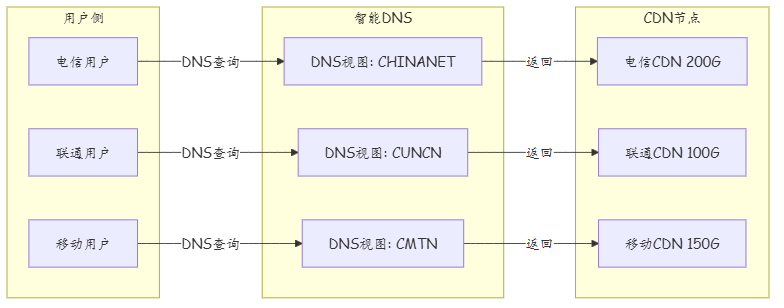
4.2 CDN多线路调度
# DNS轮询调度到不同CDN
# 配置DNS视图,根据用户来源返回不同CDN地址
[Huawei] dns view CHINANET
[Huawei-dns-view-CHINANET] a-record video.example.com 203.0.113.50
[Huawei-dns-view-CHINANET] a-record video.example.com 203.0.113.51
[Huawei-dns-view-CHINANET] quit

[Huawei] dns view CUNCN
[Huawei-dns-view-CUNCN] a-record video.example.com 198.51.100.50
[Huawei-dns-view-CUNCN] a-record video.example.com 198.51.100.51
[Huawei-dns-view-CUNCN] quit

[Huawei] dns view CMTN
[Huawei-dns-view-CMTN] a-record video.example.com 192.0.2.50
[Huawei-dns-view-CMTN] quit

# 配置DNS视图映射(根据源IP归属不同运营商)
[Huawei] dns ipv4-source-address-view
[Huawei-dns-map] view-map address 58.0.0.0 8 CHINANET
[Huawei-dns-map] view-map address 210.0.0.0 8 CUNCN
[Huawei-dns-map] view-map address 139.0.0.0 8 CMTN
[Huawei-dns-map] quit
CDN多线调度架构:
4.3 扩容验证方法
| 验证步骤 | 方法 | 命令/工具 | 通过标准 |
|---|---|---|---|
| 1. 链路带宽 | iPerf3压测 | iperf3 -c server -t 300 |
达到标称90% |
| 2. QoS策略 | 流量分类验证 | display traffic-policy applied-interface |
分类准确 |
| 3. CDN调度 | DNS查询验证 | nslookup video.example.com |
按运营商返回 |
| 4. 业务体验 | 视频卡顿率统计 | 业务系统监控面板 | <2% |
| 5. 链路均衡 | NetStream流量比 | display netstream statistics |
各线流量均衡 |
| 6. 告警阈值 | 告警系统测试 | 模拟高负载场景 | 告警正常触发 |
4.5 扩容效果
| 指标 | 扩容前 | 扩容后 | 改善 |
|---|---|---|---|
| CDN出口峰值利用率 | 95% | 62% | ↓35% |
| 视频卡顿率 | 15% | 2% | ↓87% |
| API响应时延 | 500ms | 80ms | ↓84% |
| 核心链路利用率 | 88% | 55% | ↓33% |
| 丢包率 | 2% | 0.05% | ↓97% |
五、经验总结
| 序号 | 经验类别 | 经验内容 | 适用场景 |
|---|---|---|---|
| 1 | 流量分析 | NetStream是瓶颈分析的基础工具,必须部署 | 流量分析 |
| 2 | 容量规划 | 按峰值流量的150%规划容量,预留冗余 | 容量规划 |
| 3 | 扩容策略 | 优先软件优化(缓存/整形),再考虑硬件扩容 | 成本控制 |
| 4 | CDN调度 | 多CDN调度比单纯增加带宽更有效 | CDN优化 |
| 5 | 监控体系 | 带宽利用率必须实时监控,设置多级告警 | 运维监控 |
| 6 | 弹性扩容 | 云环境中使用弹性带宽,按需扩容 | 云网络 |
| 7 | 压测验证 | 扩容前必须通过压力测试验证容量 | 验证测试 |
| 8 | 趋势预测 | 基于历史数据预测未来容量需求 | 容量预测 |
| 9 | 灰度扩容 | 扩容按灰度方式进行,先小规模验证 | 变更管理 |
| 10 | 成本优化 | 闲时带宽可降级,降低总体成本 | 成本优化 |
思考
附录:性能瓶颈分类表(扩展)
| 瓶颈类别 | 子分类 | 典型症状 | 定位方法 | 解决方向 |
|---|---|---|---|---|
| 带宽瓶颈 | 出口带宽饱和 | 丢包率高、下载慢 | SNMP利用率>80% | 扩容/多线/BGP选路优化 |
| 带宽瓶颈 | 内部链路饱和 | 服务器间延迟高 | 端口利用率>80% | 链路聚合/升级速率 |
| 带宽瓶颈 | 无线带宽不足 | WiFi体验差 | 空口利用率>70% | 增加AP/信道优化 |
| 延迟瓶颈 | 物理距离远 | RTT高、视频卡顿 | Tracert逐跳分析 | CDN/边缘节点/专线 |
| 延迟瓶颈 | 路由跳数过多 | 绕路导致延迟增加 | Tracert路径分析 | 优化BGP/OSPF策略 |
| 延迟瓶颈 | 设备处理延迟 | 特定节点延迟突增 | 逐跳延迟对比 | 升级设备/优化队列 |
| 丢包瓶颈 | 队列溢出 | 拥塞时丢包 | 接口discard计数 | QoS整形/扩容带宽 |
| 丢包瓶颈 | CRC错误 | 持续性低比例丢包 | 接口error计数 | 更换光模块/光纤 |
| 丢包瓶颈 | MTU不匹配 | 大报文丢包、小包正常 | Ping -s测试 | 统一MTU/启用PMTUD |
| 设备瓶颈 | CPU过载 | 控制平面丢包 | display cpu-usage>80% | 路由聚合/硬件加速 |
| 设备瓶颈 | 内存不足 | 会话/转发表溢出 | display memory-usage | 扩容/清理无效条目 |
| 设备瓶颈 | 转发能力不足 | 线速无法达到 | 交换容量对比 | 升级设备 |
| 应用瓶颈 | 连接数耗尽 | 新连接被拒绝 | 连接数监控 | 调整连接池/优化连接复用 |
| 应用瓶颈 | TIME_WAIT堆积 | 端口耗尽 | netstat统计 | 调整tcp_tw_reuse |
| 安全瓶颈 | 策略匹配慢 | 特定流量延迟高 | 策略命中统计 | 策略优化/硬件匹配 |
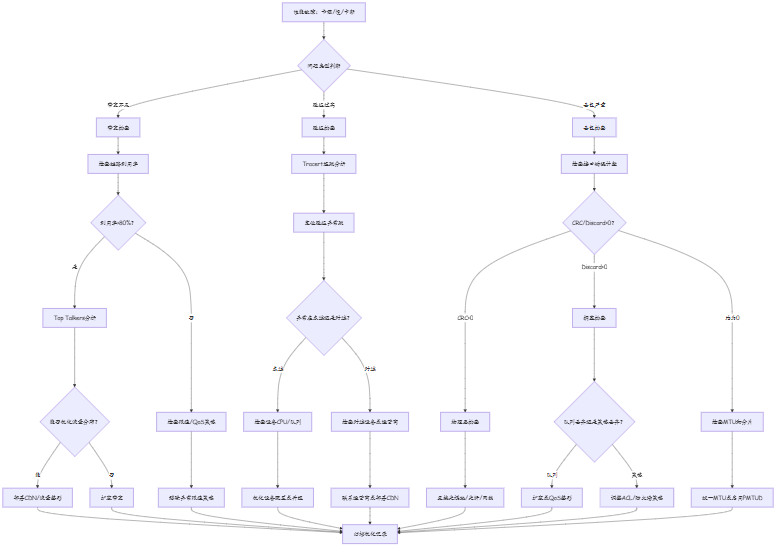
附录:带宽/延迟/丢包排查流程
附录:优化前后指标对比表(扩展)
| 指标维度 | 优化前基线 | 优化后实测 | 改善幅度 | 达标情况 |
|---|---|---|---|---|
| CDN出口峰值利用率 | 95% | 62% | ↓35% | ✅ 目标<70% |
| 电信CDN带宽 | 200Gbps | 300Gbps | ↑50% | ✅ 扩容50% |
| 联通CDN带宽 | 100Gbps | 200Gbps | ↑100% | ✅ 扩容100% |
| 新增移动CDN | 无 | 150Gbps | 新增 | ✅ 覆盖移动用户 |
| 视频卡顿率 | 15% | 2% | ↓87% | ✅ 目标<3% |
| API响应时延(P95) | 500ms | 80ms | ↓84% | ✅ 目标<100ms |
| 核心链路利用率 | 88% | 55% | ↓33% | ✅ 目标<70% |
| 端到端丢包率 | 2% | 0.05% | ↓97% | ✅ 目标<0.1% |
| 东西向流量带宽 | 40Gbps | 100Gbps | ↑150% | ✅ 扩容150% |
| TCP TIME_WAIT占比 | 36% | 12% | ↓67% | ✅ 目标<20% |
| 数据库连接池使用率 | 98% | 65% | ↓33% | ✅ 目标<80% |
| CPU利用率(峰值) | 85% | 45% | ↓47% | ✅ 目标<60% |
- 在带宽扩容时,如何区分"真瓶颈"和"假瓶颈"?有哪些判断标准?
- 如果预算有限无法扩容物理带宽,有哪些技术手段可以缓解带宽压力?
- AI驱动的智能带宽调度在什么场景下比传统阈值触发扩容更有效?
下篇预告:第354篇:网络流量模型分析与容量规划