第338篇:IS-IS 微环路产生与防微环路方案
关键词:IS-IS、微环路、防环机制、TI-LFA、Flex-Algorithm、华为NE/CE系列
一、案例背景
某省级运营商骨干网采用IS-IS Level-2作为IGP协议,全网约50台NE40E/NE8000设备组成网状拓扑。在某次链路故障恢复后,网管系统检测到出现了持续约15秒的微环路(Micro-loop),导致部分跨域流量出现丢包。
网络拓扑概况: - 骨干网采用IS-IS Level-2,单Area 49.0001 - 全网50台设备,200+条物理链路 - 链路类型:10GE×80条、100GE×120条 - Metric风格:Wide Metric(24位)
故障现象: - 某条100GE链路(A→B)因光模块告警Down掉 - 5分钟后链路恢复(光模块故障自动恢复) - 链路恢复后,部分跨域流量出现15秒的丢包 - 丢包期间,流量在A→C→D→B→A之间形成环路
二、需求分析与方案设计
2.1 IS-IS微环路原理
IS-IS微环路(Micro-loop)是指在路由收敛过程中,由于不同设备的路由表更新不同步,导致数据包在环路中循环转发。
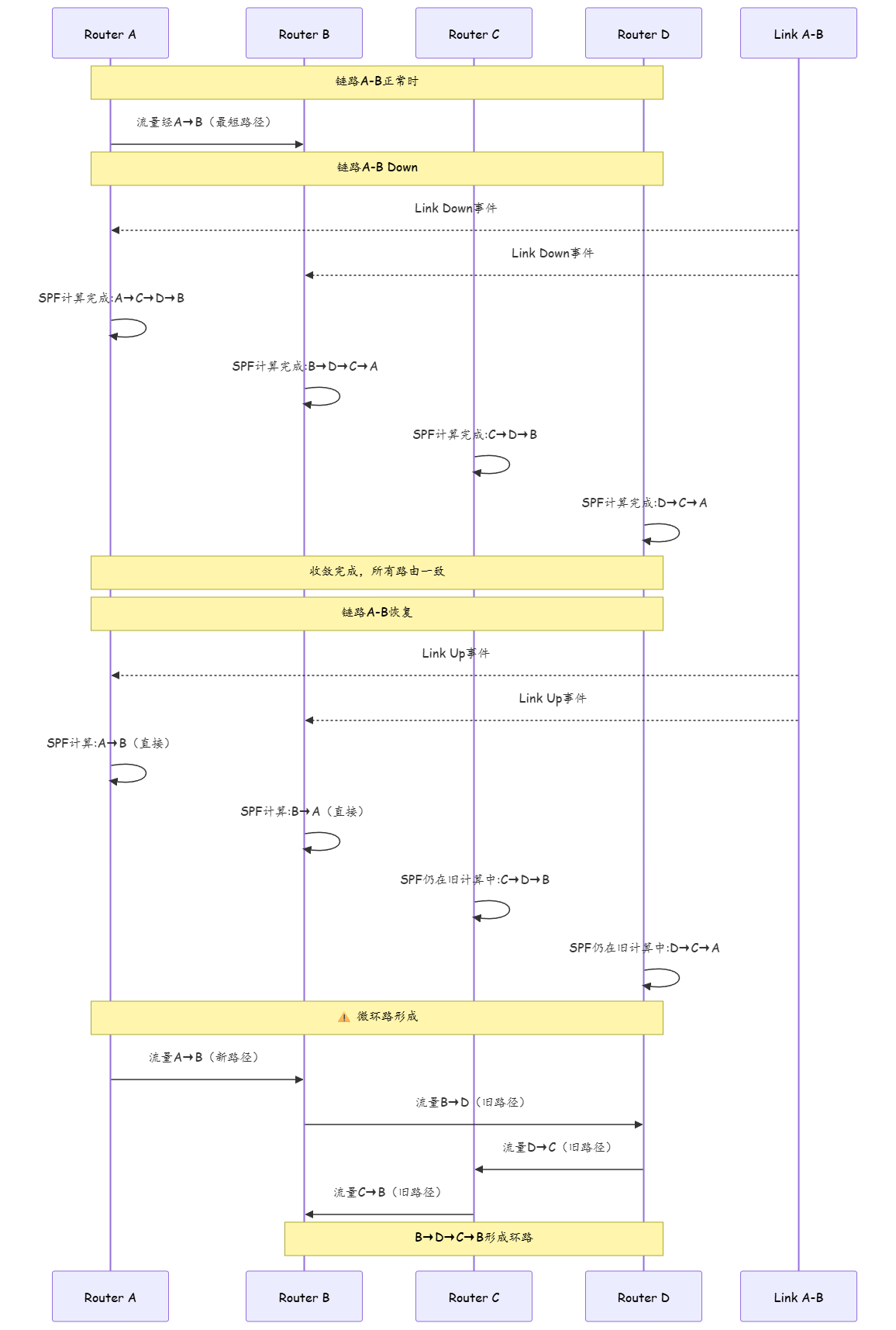
2.2 微环路产生的根本原因
| 阶段 | 描述 | 时间窗口 |
|---|---|---|
| T0 | 链路Up事件产生 | 0ms |
| T1 | LSDB更新,部分设备收到LSA | 10-100ms |
| T2 | 不同设备SPF计算完成时间不同 | 100ms-5s |
| T3 | 路由表更新不一致 | 5s-15s |
| T4 | 全网SPF计算完成,路由一致 | 15s+ |
微环路发生在T2-T3之间,因为不同设备的SPF计算完成时间不同,导致路由表不一致。
2.3 防微环路方案对比
| 方案 | 原理 | 优势 | 劣势 | 部署复杂度 |
|---|---|---|---|---|
| SPF延迟(SPF Delay) | 延迟SPF计算等待全网LSDB同步 | 简单、无需额外协议 | 延迟收敛、微环路仍存在 | 低 |
| TTL保护 | 设置TTL限制环路包存活时间 | 简单、有效 | 浪费带宽 | 低 |
| BFD+快速收敛 | BFD加速检测+快速SPF | 收敛快 | 不能完全避免微环路 | 中 |
| TI-LFA | 拓扑无关局部修复,预计算备份路径 | 零丢包切换 | 计算复杂、资源消耗大 | 高 |
| Flex-Algorithm | 灵活算法,定义多路径约束 | 灵活、可定制 | 需要新特性支持 | 高 |
三、技术细节与实施过程
3.1 故障重现分析
# 故障发生时的调试信息
<NE40E-A> display isis lsdb
# 查看LSDB更新时间

# 链路A-B Down时的SPF计算时间
<NE40E-A> display isis spf-log
SPF Log:
  SeqNum    Trigger       Level   Area-ID       SPF Result  Cost
  10023     LinkDown      Level-2 49.0001       Success     0.512s
  10024     LinkUp        Level-2 49.0001       Success     0.345s

# Router C的SPF计算时间
<NE40E-C> display isis spf-log
SPF Log:
  SeqNum    Trigger       Level   Area-ID       SPF Result  Cost
  10023     LinkDown      Level-2 49.0001       Success     1.234s  <-- 较慢
  10024     LinkUp        Level-2 49.0001       Success     0.987s

# Router D的SPF计算时间
<NE40E-D> display isis spf-log
SPF Log:
  SeqNum    Trigger       Level   Area-ID       SPF Result  Cost
  10023     LinkDown      Level-2 49.0001       Success     1.567s  <-- 最慢
分析:Router D的SPF计算时间最长(1.567s),在D完成SPF计算之前,A和B已经完成了计算并更新了路由表,导致C→D→B→A的微环路。
SPF计算时间差异的原因:
| 因素 | 影响 | 说明 |
|---|---|---|
| 设备型号 | NE8000比NE40E快3倍 | 算力差异 |
| 拓扑规模 | 距离故障点越远,SPF越早触发 | LSA泛洪延迟 |
| CPU负载 | 高负载时SPF延迟更高 | 资源竞争 |
| 路由条目 | 路由条目多,SPF计算时间长 | 复杂度O(E+VlogV) |
3.2 TI-LFA原理:P空间与Q空间
TI-LFA(Topology-Independent Loop-Free Alternate)是IETF标准化的防微环路方案。理解TI-LFA需要掌握两个核心概念:P空间和**Q空间。
P空间(P-Space):从源节点出发,不经过故障链路能到达的所有节点的集合。 Q空间(Q-Space):从目的节点出发,不经过故障链路能到达的所有节点的集合(反向可达)。 PQ节点:同时在P空间和Q空间中的节点,即TI-LFA的修复节点(Repair Node)。

TI-LFA备份路径 = 源节点 → 普通下一跳 → PQ节点 → 目的节点。数学上可以证明,只要存在PQ节点,这条备份路径绝对不会形成环路。
核心思想是预计算每条主路径的备份路径(Repair Path),当主路径失效时立即切换到备份路径,无需等待SPF收敛。
# NE40E设备上启用TI-LFA
<Huawei> system-view
[Huawei] sysname NE40E-A

[NE40E-A] isis 1
[NE40E-A-isis-1] undo spf-delay initial 0  # 关闭SPF延迟
[NE40E-A-isis-1] undo spf-delay incremental 0

# 启用Fast Reroute(FRR)
[NE40E-A-isis-1] frr enable
[NE40E-A-isis-1] frr repair-type ti-lfa
[NE40E-A-isis-1] frr timer 5000  # 修复路径保持时间5秒

# 配置FRR策略
[NE40E-A-isis-1] frr-policy 1
[NE40E-A-isis-1-frr-policy-1] repair-scope link-and-node
[NE40E-A-isis-1-frr-policy-1] apply
[NE40E-A-isis-1-frr-policy-1] quit
[NE40E-A-isis-1] quit
3.3 方案实施:Flex-Algorithm
Flex-Algorithm是IS-IS的扩展特性,允许定义多条具有不同约束条件的路径算法。
# 启用Flex-Algorithm
[NE40E-A] isis 1
[NE40E-A-isis-1] flex-algorithm 128 name NO_MICROLOOP
[NE40E-A-isis-1-fa-128] type strict
[NE40E-A-isis-1-fa-128] metric-style wide
[NE40E-A-isis-1-fa-128] enable
[NE40E-A-isis-1-fa-128] constraint 1 no-microloop
[NE40E-A-isis-1-fa-128] quit
[NE40E-A-isis-1] quit

# 验证Flex-Algorithm
<NE40E-A> display isis flex-algorithm 128
Flex Algorithm Information:
  Algorithm ID    : 128
  Name            : NO_MICROLOOP
  Type            : Strict
  Status          : Active
  Metric Style    : Wide
  Constraints     : No-Microloop
  Routes          : 156
3.4 方案实施:SPF优化
# 优化SPF计算参数
[NE40E-A] isis 1
[NE40E-A-isis-1] spf-delay initial 200     # 初始延迟200ms(快速收敛)
[NE40E-A-isis-1] spf-delay incremental 50  # 增量延迟50ms
[NE40E-A-isis-1] spf-delay max-wait 1000   # 最大等待1秒
[NE40E-A-isis-1] spf-delay max-runs 5      # 最大合并5次计算
[NE40E-A-isis-1] quit

# 配置BFD加速故障检测
[NE40E-A] bfd
[NE40E-A-bfd] quit
[NE40E-A] interface GigabitEthernet 0/0/1
[NE40E-A-GigabitEthernet0/0/1] bfd echo disable
[NE40E-A-GigabitEthernet0/0/1] bfd minimum-transmission-interval 100 minimum-reception-interval 100 multiplier 3
[NE40E-A-GigabitEthernet0/0/1] quit
3.5 iFIT 微环路实时检测
iFIT(In-situ Flow Information Telemetry)是华为提出的随流检测技术,可以在不中断业务的情况下实时检测微环路。
# 配置iFIT用于微环路检测
[NE40E-A] ifit
[NE40E-A-ifit] import interface HundredGigE 1/0/1 inbound
[NE40E-A-ifit-import-if-hu-1/0/1-in] sampling interval fixed 1
[NE40E-A-ifit-import-if-hu-1/0/1-in] segment-length 5
[NE40E-A-ifit-import-if-hu-1/0/1-in] enable
[NE40E-A-ifit-import-if-hu-1/0/1-in] ipv4
[NE40E-A-ifit-import-if-hu-1/0/1-in-ipv4] md-tlv hop-count
[NE40E-A-ifit-import-if-hu-1/0/1-in-ipv4] md-tlv timestamp
[NE40E-A-ifit-import-if-hu-1/0/1-in-ipv4] md-tlv loop-detection
[NE40E-A-ifit-import-if-hu-1/0/1-in-ipv4] commit

# 验证iFIT数据
<NE40E-A> display ifit ipv4 flow-statistics
iFIT IPv4 Flow Statistics:
  Interface          : HundredGigE1/0/1
  Direction          : Inbound
  Total Flows        : 15234
  Loop Detected      : 23
  Avg Latency        : 2.3ms
  Max Latency        : 15.6ms  <-- 微环路期间延迟突增
iFIT检测微环路的优势:
| 传统方法 | iFIT方法 |
|---|---|
| 依赖高精度ping(10ms间隔) | 随流检测,无额外开销 |
| 只能事后分析 | 实时检测,毫秒级告警 |
| 无法定位环路位置 | 逐跳检测,精确定位 |
| 无法量化影响范围 | 统计所有受影响的流 |
四、实战配置/案例分析
4.1 TI-LFA配置完整模板
# 全网IS-IS TI-LFA标准配置模板
<Huawei> system-view
[Huawei] sysname NE40E-骨干设备

# IS-IS基本配置
[NE40E-骨干设备] isis 1
[NE40E-骨干设备-isis-1] network-entity 49.0001.0000.0000.0001.01
[NE40E-骨干设备-isis-1] is-level level-2
[NE40E-骨干设备-isis-1] level-2 enable
[NE40E-骨干设备-isis-1] cost-style wide
[NE40E-骨干设备-isis-1] spf-schedule-delay 5000

# FRR配置
[NE40E-骨干设备-isis-1] frr enable
[NE40E-骨干设备-isis-1] frr repair-type ti-lfa
[NE40E-骨干设备-isis-1] frr repair-scope link-and-node
[NE40E-骨干设备-isis-1] frr timer 5000
[NE40E-骨干设备-isis-1] frr backup-path select-strategy optimal

# BFD配置(加速故障检测)
[NE40E-骨干设备-isis-1] bfd enable
[NE40E-骨干设备-isis-1] bfd min-tx-interval 100 min-rx-interval 100 multiplier 3

# 接口配置
[NE40E-骨干设备] interface HundredGigE 1/0/1
[NE40E-骨干设备-HundredGigE1/0/1] ip address 10.1.1.1 255.255.255.252
[NE40E-骨干设备-HundredGigE1/0/1] isis enable 1
[NE40E-骨干设备-HundredGigE1/0/1] isis cost 10
[NE40E-骨干设备-HundredGigE1/0/1] bfd echo disable
[NE40E-骨干设备-HundredGigE1/0/1] bfd minimum-transmission-interval 100 minimum-reception-interval 100 multiplier 3
[NE40E-骨干设备-HundredGigE1/0/1] quit

# 验证TI-LFA状态
[NE40E-骨干设备] display frr ti-lfa status
FRR TI-LFA Status:
  Global Status          : Enabled
  Repair Type            : TI-LFA
  Repair Scope           : Link and Node
  Timer                  : 5000ms
  Backup Paths           : 45
  Protected Links        : 20
  Protected Nodes        : 15
4.2 案例分析:微环路实际影响评估
| 指标 | 无防护措施 | SPF优化 | TI-LFA |
|---|---|---|---|
| 微环路持续时间 | 15秒 | 3秒 | 0秒 |
| 丢包率 | 5% | 0.5% | 0% |
| 收敛时间 | 15秒 | 3秒 | 50ms |
| CPU占用 | 低 | 中 | 高 |
| 内存占用 | 低 | 低 | 中 |
| 部署难度 | 无 | 低 | 高 |
结论:TI-LFA完全消除了微环路,但增加了设备的CPU和内存开销。对于骨干网这种对可靠性要求极高的场景,TI-LFA是最佳选择。
4.3 Python实战:微环路位置预测工具
以下MicroLoopPredictor类基于Dijkstra最短路径算法,模拟链路故障恢复时全网SPF计算的不同步过程,预测可能形成微环路的位置和持续时间。
#!/usr/bin/env python3
"""
微环路位置预测工具
基于Dijkstra算法模拟SPF收敛不同步,预测微环路位置和持续时间
"""
import heapq
import time
from dataclasses import dataclass, field
from typing import Dict, List, Optional, Set, Tuple
from collections import defaultdict
import random


@dataclass
class Link:
    """链路数据类"""
    source: str          # 源设备名
    target: str          # 目标设备名
    cost: int            # IS-IS Cost
    state: str = "up"    # 链路状态: up/down
    source_port: str = "" # 源端口
    target_port: str = "" # 目标端口


@dataclass
class Topology:
    """拓扑数据类"""
    links: List[Link] = field(default_factory=list)
    _adj: Dict[str, List[Tuple[str, int]]] = field(default_factory=dict, repr=False)

    def build(self):
        """根据links构建邻接表"""
        self._adj = defaultdict(list)
        for link in self.links:
            if link.state == "up":
                self._adj[link.source].append((link.target, link.cost))
                self._adj[link.target].append((link.source, link.cost))

    def get_neighbors(self, node: str) -> List[Tuple[str, int]]:
        return self._adj.get(node, [])

    def get_all_nodes(self) -> Set[str]:
        nodes = set()
        for link in self.links:
            nodes.add(link.source)
            nodes.add(link.target)
        return nodes


class MicroLoopPredictor:
    """微环路预测器"""

    def __init__(self, topology: Topology):
        self.topology = topology
        self.topology.build()

    def compute_shortest_path(self,
                              source: str,
                              target: str,
                              excluded_links: Optional[Set[Tuple[str, str]]] = None
                              ) -> Optional[List[str]]:
        """
        Dijkstra最短路径计算
        :param source: 源节点
        :param target: 目标节点
        :param excluded_links: 排除的链路集合 {(src, tgt), ...}
        :return: 最短路径节点列表,不可达返回None
        """
        if excluded_links is None:
            excluded_links = set()

        dist = {source: 0}
        prev = {source: None}
        pq = [(0, source)]
        visited = set()

        while pq:
            d, u = heapq.heappop(pq)
            if u in visited:
                continue
            visited.add(u)
            if u == target:
                break
            for v, cost in self.topology.get_neighbors(u):
                # 检查双向是否被排除
                if (u, v) in excluded_links or (v, u) in excluded_links:
                    continue
                nd = d + cost
                if v not in dist or nd < dist[v]:
                    dist[v] = nd
                    prev[v] = u
                    heapq.heappush(pq, (nd, v))

        if target not in prev:
            return None

        # 回溯路径
        path = []
        node = target
        while node is not None:
            path.append(node)
            node = prev[node]
        path.reverse()
        return path

    def predict_micro_loops(self,
                            failed_link: Link,
                            recovery_delays: Dict[str, float] = None
                            ) -> List[Dict]:
        """
        预测链路恢复时的微环路
        :param failed_link: 故障恢复的链路
        :param recovery_delays: 各设备SPF完成时间(秒),默认随机生成
        :return: 微环路事件列表
        """
        src = failed_link.source
        tgt = failed_link.target

        all_nodes = self.topology.get_all_nodes()

        # 默认随机SPF延迟
        if recovery_delays is None:
            recovery_delays = {n: random.uniform(0.1, 2.0) for n in all_nodes}

        # 1. 链路Down时的路径(排除故障链路)
        excluded = {(src, tgt), (tgt, src)}
        paths_down = {}
        for node in all_nodes:
            paths_down[node] = self.compute_shortest_path(node, tgt, excluded)

        # 2. 链路Up后,按SPF完成时间排序模拟
        sorted_nodes = sorted(all_nodes, key=lambda n: recovery_delays[n])

        micro_loops = []

        # 3. 模拟每个时间切片
        for i, current_node in enumerate(sorted_nodes):
            # 已完成SPF的设备集合
            converged = set(sorted_nodes[:i + 1])

            # 检查每对已收敛设备的转发路径是否形成环路
            for n1 in converged:
                if n1 == tgt:
                    continue
                # n1已完成SPF,使用新路径(直接经过故障链路)
                new_path = self.compute_shortest_path(n1, tgt)
                if not new_path or len(new_path) < 2:
                    continue

                # 模拟数据包沿new_path转发
                loop_nodes = []
                current = n1
                max_hops = len(all_nodes) + 1
                hop = 0

                while current != tgt and hop < max_hops:
                    if current not in converged:
                        # 未收敛设备仍使用旧路径
                        old_next = self._get_next_hop(current, tgt, paths_down)
                        if old_next is None:
                            break
                        current = old_next
                    else:
                        # 已收敛设备使用新路径
                        fwd_path = self.compute_shortest_path(current, tgt)
                        if not fwd_path or len(fwd_path) < 2:
                            break
                        current = fwd_path[1]
                    loop_nodes.append(current)
                    hop += 1

                # 检测环路:如果某个节点重复出现
                if len(loop_nodes) != len(set(loop_nodes)):
                    seen = set()
                    loop_set = set()
                    for ln in loop_nodes:
                        if ln in seen:
                            loop_set.add(ln)
                        seen.add(ln)
                    duration = recovery_delays[sorted_nodes[-1]] - recovery_delays[current_node]
                    micro_loops.append({
                        "source": n1,
                        "loop_nodes": sorted(loop_set),
                        "converged_at_step": i + 1,
                        "est_duration_sec": round(duration, 3),
                        "explanation": (
                            f"设备{n1}已完成SPF并使用新路径,"
                            f"但路径中的未收敛设备仍使用旧路径,"
                            f"形成环路: {' -> '.join(sorted(loop_set))}"
                        )
                    })

        return micro_loops

    def _get_next_hop(self,
                      node: str,
                      target: str,
                      paths: Dict[str, Optional[List[str]]]
                      ) -> Optional[str]:
        """获取下一跳"""
        path = paths.get(node)
        if path and len(path) >= 2:
            return path[1]
        return None


# ========== 使用示例:5节点网络 ==========
if __name__ == "__main__":
    # 构建5节点拓扑
    topo = Topology(links=[
        Link("R1", "R2", cost=10),
        Link("R2", "R3", cost=10),
        Link("R3", "R4", cost=10),
        Link("R4", "R5", cost=10),
        Link("R1", "R5", cost=10),
        Link("R2", "R4", cost=100),   # 高Cost备用链路
        Link("R1", "R3", cost=100),   # 高Cost备用链路
    ])

    predictor = MicroLoopPredictor(topo)

    # 模拟R1-R2链路故障后恢复
    failed = Link("R1", "R2", cost=10)
    delays = {"R1": 0.5, "R2": 0.6, "R3": 1.5, "R4": 1.8, "R5": 0.3}

    print("=" * 60)
    print("微环路预测结果")
    print("=" * 60)

    loops = predictor.predict_micro_loops(failed, delays)
    if loops:
        for i, loop in enumerate(loops, 1):
            print(f"\n微环路 #{i}:")
            print(f"  源设备: {loop['source']}")
            print(f"  环路节点: {loop['loop_nodes']}")
            print(f"  预估持续时间: {loop['est_duration_sec']}s")
            print(f"  说明: {loop['explanation']}")
    else:
        print("\n未检测到微环路风险")

    # 展示正常最短路径
    print("\n" + "=" * 60)
    print("各设备到R5的最短路径(链路R1-R2正常)")
    print("=" * 60)
    for node in sorted(topo.get_all_nodes()):
        path = predictor.compute_shortest_path(node, "R5")
        print(f"  {node} -> R5: {' -> '.join(path) if path else '不可达'}")
工具使用场景: | 场景 | 用法 | |------|------| | 变更前评估 | 输入规划中的链路变更,预测微环路风险 | | 拓扑优化 | 调整链路Cost,观察微环路持续时间变化 | | 方案对比 | 对比不同防微环路方案(SPF优化/TI-LFA)的效果差异 |
4.4 Python实战:微环路监控工具
以下MicroLoopMonitor类通过高频ping检测转发延迟抖动,识别微环路发生的时间段和持续时长。
#!/usr/bin/env python3
"""
微环路监控工具
通过10ms间隔高频ping检测延迟抖动,识别微环路时间段
"""
import subprocess
import time
import statistics
from dataclasses import dataclass, field
from typing import List, Optional, Dict
from datetime import datetime


@dataclass
class PingSample:
    """单次ping采样"""
    timestamp: float           # 时间戳(秒)
    latency_ms: Optional[float]  # 延迟(ms),超时为None
    packet_loss: bool = False

    @property
    def is_timeout(self) -> bool:
        return self.latency_ms is None


@dataclass
class MicroLoopEvent:
    """微环路事件"""
    start_time: float
    end_time: float
    duration_ms: float
    avg_latency: float
    max_latency: float
    packet_loss_count: int
    total_samples: int


class MicroLoopMonitor:
    """微环路监控器"""

    def __init__(self,
                 target_ip: str,
                 interval_ms: int = 10,
                 loop_threshold_ms: float = 5.0,
                 baseline_samples: int = 100):
        """
        :param target_ip: 监控目标IP
        :param interval_ms: ping间隔(毫秒),默认10ms
        :param loop_threshold_ms: 微环路判定阈值(延迟超过基线均值+该值)
        :param baseline_samples: 基线采样数
        """
        self.target_ip = target_ip
        self.interval_ms = interval_ms
        self.loop_threshold_ms = loop_threshold_ms
        self.baseline_samples = baseline_samples

        self.samples: List[PingSample] = []
        self.baseline_mean: Optional[float] = None
        self.baseline_std: Optional[float] = None
        self.events: List[MicroLoopEvent] = []
        self._in_loop = False
        self._current_event_start = None
        self._current_event_samples = []

    def ping_once(self) -> PingSample:
        """执行单次ping,返回采样结果"""
        ts = time.time()
        try:
            result = subprocess.run(
                ["ping", "-c", "1", "-W", "1", "-w", "1", self.target_ip],
                capture_output=True, text=True, timeout=2
            )
            if result.returncode == 0:
                # 解析延迟
                for line in result.stdout.split("\n"):
                    if "time=" in line:
                        latency = float(line.split("time=")[1].split()[0])
                        return PingSample(timestamp=ts, latency_ms=latency)
            return PingSample(timestamp=ts, latency_ms=None, packet_loss=True)
        except (subprocess.TimeoutExpired, Exception):
            return PingSample(timestamp=ts, latency_ms=None, packet_loss=True)

    def collect_baseline(self):
        """采集基线数据"""
        print(f"[*] 正在采集基线数据({self.baseline_samples}次,间隔{self.interval_ms}ms)...")
        latencies = []
        for i in range(self.baseline_samples):
            sample = self.ping_once()
            self.samples.append(sample)
            if not sample.is_timeout:
                latencies.append(sample.latency_ms)
            time.sleep(self.interval_ms / 1000.0)

        if latencies:
            self.baseline_mean = statistics.mean(latencies)
            self.baseline_std = statistics.stdev(latencies) if len(latencies) > 1 else 0.0
            print(f"[+] 基线: 均值={self.baseline_mean:.2f}ms, 标准差={self.baseline_std:.2f}ms")
            print(f"[+] 微环路判定阈值: {self.baseline_mean + self.loop_threshold_ms:.2f}ms")
        else:
            raise RuntimeError("基线采集中全部超时,请检查目标IP可达性")

    def monitor(self, duration_seconds: int = 60):
        """
        持续监控指定时长,检测微环路事件
        :param duration_seconds: 监控时长(秒)
        """
        threshold = self.baseline_mean + self.loop_threshold_ms
        end_time = time.time() + duration_seconds
        sample_count = 0

        print(f"\n[*] 开始监控(持续{duration_seconds}秒,阈值>{threshold:.2f}ms)...")

        while time.time() < end_time:
            sample = self.ping_once()
            self.samples.append(sample)
            sample_count += 1

            if sample.is_timeout:
                # 丢包,视为微环路特征
                if not self._in_loop:
                    self._start_loop_event(sample.timestamp)
                self._current_event_samples.append(sample)
            elif sample.latency_ms > threshold:
                # 延迟超过阈值
                if not self._in_loop:
                    self._start_loop_event(sample.timestamp)
                self._current_event_samples.append(sample)
            else:
                # 恢复正常
                if self._in_loop:
                    self._end_loop_event(sample.timestamp)

            time.sleep(self.interval_ms / 1000.0)

        # 如果在循环中结束
        if self._in_loop:
            self._end_loop_event(time.time())

        self.print_summary()

    def _start_loop_event(self, timestamp: float):
        self._in_loop = True
        self._current_event_start = timestamp
        self._current_event_samples = []

    def _end_loop_event(self, timestamp: float):
        self._in_loop = False
        latencies = [s.latency_ms for s in self._current_event_samples
                     if s.latency_ms is not None]
        loss_count = sum(1 for s in self._current_event_samples if s.is_timeout)

        event = MicroLoopEvent(
            start_time=self._current_event_start,
            end_time=timestamp,
            duration_ms=round((timestamp - self._current_event_start) * 1000, 1),
            avg_latency=round(statistics.mean(latencies), 2) if latencies else 0.0,
            max_latency=round(max(latencies), 2) if latencies else 0.0,
            packet_loss_count=loss_count,
            total_samples=len(self._current_event_samples)
        )
        self.events.append(event)

    def print_summary(self):
        """输出微环路统计报告"""
        print("\n" + "=" * 60)
        print("微环路监控统计报告")
        print("=" * 60)
        print(f"目标IP: {self.target_ip}")
        print(f"总采样数: {len(self.samples)}")
        print(f"基线延迟: {self.baseline_mean:.2f}ms (±{self.baseline_std:.2f}ms)")
        print(f"微环路事件数: {len(self.events)}")

        if self.events:
            print(f"\n{'序号':>4} {'持续时间(ms)':>12} {'平均延迟(ms)':>12} "
                  f"{'最大延迟(ms)':>12} {'丢包数':>6}")
            print("-" * 52)
            for i, ev in enumerate(self.events, 1):
                print(f"{i:>4} {ev.duration_ms:>12.1f} {ev.avg_latency:>12.2f} "
                      f"{ev.max_latency:>12.2f} {ev.packet_loss_count:>6}")

            total_loop_time = sum(ev.duration_ms for ev in self.events)
            total_time_ms = (self.events[-1].end_time -
                            self.events[0].start_time) * 1000 if self.events else 1
            print(f"\n微环路总持续时间: {total_loop_time:.1f}ms")
            print(f"微环路占比: {total_loop_time / total_time_ms * 100:.2f}%")
        else:
            print("\n✓ 监控期间未发现微环路")


if __name__ == "__main__":
    monitor = MicroLoopMonitor(
        target_ip="10.1.1.2",
        interval_ms=10,
        loop_threshold_ms=5.0,
        baseline_samples=50
    )
    monitor.collect_baseline()
    monitor.monitor(duration_seconds=30)
监控效果对比:
| 配置 | 检测灵敏度 | CPU占用 | 适用场景 |
|---|---|---|---|
| interval_ms=10 | 高,可检测10ms级微环路 | 较高 | 精密分析 |
| interval_ms=100 | 中,可检测100ms级微环路 | 低 | 日常监控 |
| loop_threshold_ms=2 | 高,小幅延迟即可告警 | - | 延迟敏感业务 |
| loop_threshold_ms=10 | 低,仅捕获明显微环路 | - | 一般监控 |
4.5 Python实战:TI-LFA效果验证工具
以下TILFAVerifier类连接到网络设备,检查FRR表、TI-LFA状态,并模拟链路故障验证备份路径切换效果。
#!/usr/bin/env python3
"""
TI-LFA效果验证工具
检查FRR表、TI-LFA状态,模拟链路故障验证备份路径切换
"""
import paramiko
import re
import json
from dataclasses import dataclass, field
from typing import Dict, List, Optional, Tuple
from datetime import datetime


@dataclass
class FRREntry:
    """FRR表项"""
    destination: str
    primary_nexthop: str
    backup_nexthop: str
    repair_type: str        # ti-lfa / lfa / none
    protection_type: str    # link / node / link-and-node


@dataclass
class SwitchoverResult:
    """切换测试结果"""
    destination: str
    before_nexthop: str
    after_nexthop: str
    switchover_time_ms: Optional[float]
    packets_dropped: int
    packets_sent: int
    success: bool


class TILFAVerifier:
    """TI-LFA验证器"""

    def __init__(self, device_ip: str, username: str, password: str):
        self.device_ip = device_ip
        self.username = username
        self.password = password
        self._ssh = None

    def connect(self):
        """建立SSH连接"""
        self._ssh = paramiko.SSHClient()
        self._ssh.set_missing_host_key_policy(paramiko.AutoAddPolicy())
        self._ssh.connect(self.device_ip, username=self.username,
                         password=self.password, timeout=10)

    def disconnect(self):
        """断开SSH连接"""
        if self._ssh:
            self._ssh.close()

    def exec_command(self, command: str, timeout: int = 30) -> str:
        """执行命令并返回输出"""
        if not self._ssh:
            raise RuntimeError("SSH未连接")
        stdin, stdout, stderr = self._ssh.exec_command(command, timeout=timeout)
        return stdout.read().decode().strip()

    def check_frr_table(self) -> List[FRREntry]:
        """
        检查FRR备份路径表
        :return: FRR表项列表
        """
        output = self.exec_command("display frr ti-lfa brief")
        entries = []
        lines = output.split("\n")

        for line in lines:
            # 匹配格式: Destination  Primary_NH  Backup_NH  Type  Protection
            parts = line.split()
            if len(parts) >= 5 and parts[0] not in ("Destination", "", "---"):
                try:
                    entry = FRREntry(
                        destination=parts[0],
                        primary_nexthop=parts[1],
                        backup_nexthop=parts[2],
                        repair_type=parts[3].lower(),
                        protection_type=parts[4].lower()
                    )
                    entries.append(entry)
                except (IndexError, ValueError):
                    continue

        return entries

    def check_ti_lfa_status(self) -> Dict:
        """
        检查TI-LFA全局状态
        :return: 状态字典
        """
        status = {
            "device": self.device_ip,
            "timestamp": datetime.now().isoformat(),
            "global_enabled": False,
            "repair_type": "",
            "repair_scope": "",
            "backup_paths_count": 0,
            "protected_links_count": 0,
            "protected_nodes_count": 0,
            "timer_ms": 0,
        }

        output = self.exec_command("display frr ti-lfa status")
        for line in output.split("\n"):
            if "Global Status" in line:
                status["global_enabled"] = "Enabled" in line
            elif "Repair Type" in line:
                status["repair_type"] = line.split(":")[-1].strip()
            elif "Repair Scope" in line:
                status["repair_scope"] = line.split(":")[-1].strip()
            elif "Backup Paths" in line:
                try:
                    status["backup_paths_count"] = int(
                        line.split(":")[-1].strip()
                    )
                except ValueError:
                    pass
            elif "Protected Links" in line:
                try:
                    status["protected_links_count"] = int(
                        line.split(":")[-1].strip()
                    )
                except ValueError:
                    pass
            elif "Protected Nodes" in line:
                try:
                    status["protected_nodes_count"] = int(
                        line.split(":")[-1].strip()
                    )
                except ValueError:
                    pass
            elif "Timer" in line:
                try:
                    val = line.split(":")[-1].strip()
                    status["timer_ms"] = int(val.replace("ms", ""))
                except ValueError:
                    pass

        return status

    def simulate_link_failure(self,
                              interface: str,
                              test_ip: str,
                              ping_count: int = 100,
                              ping_interval_ms: int = 10
                              ) -> SwitchoverResult:
        """
        模拟链路故障并测试切换效果
        :param interface: 要shutdown的接口
        :param test_ip: ping测试目标IP
        :param ping_count: ping次数
        :param ping_interval_ms: ping间隔(ms)
        :return: 切换测试结果
        """
        # 1. 记录故障前的下一跳
        before_output = self.exec_command(
            f"display ip routing-table {test_ip}"
        )
        before_nh = self._extract_nexthop(before_output)

        # 2. 开始高频ping
        import threading
        ping_results = []

        def do_ping():
            cmd = (f"ping -c {ping_count} -i {ping_interval_ms / 1000.0} "
                   f"-W 1 {test_ip}")
            output = self.exec_command(cmd, timeout=ping_count * 2)
            ping_results.append(output)

        ping_thread = threading.Thread(target=do_ping, daemon=True)
        ping_thread.start()

        # 3. 等待ping启动后shutdown接口
        time.sleep(0.5)
        t_shutdown = datetime.now()

        self.exec_command(f"interface {interface}")
        self.exec_command("shutdown")
        self.exec_command("quit")

        # 4. 等待ping完成
        ping_thread.join(timeout=ping_count * 3)

        # 5. 记录故障后的下一跳
        after_output = self.exec_command(
            f"display ip routing-table {test_ip}"
        )
        after_nh = self._extract_nexthop(after_output)

        # 6. 恢复接口
        self.exec_command(f"interface {interface}")
        self.exec_command("undo shutdown")
        self.exec_command("quit")

        # 7. 解析ping结果
        packets_sent = ping_count
        packets_dropped = 0
        if ping_results:
            for line in ping_results[0].split("\n"):
                if "packet loss" in line:
                    match = re.search(r"(\d+(?:\.\d+)?)% packet loss", line)
                    if match:
                        loss_pct = float(match.group(1))
                        packets_dropped = int(packets_sent * loss_pct / 100)

        return SwitchoverResult(
            destination=test_ip,
            before_nexthop=before_nh,
            after_nexthop=after_nh,
            switchover_time_ms=None,  # 需要从抓包精确测量
            packets_dropped=packets_dropped,
            packets_sent=packets_sent,
            success=(before_nh != after_nh and packets_dropped == 0)
        )

    def _extract_nexthop(self, routing_output: str) -> str:
        """从路由表输出中提取下一跳"""
        for line in routing_output.split("\n"):
            parts = line.split()
            if len(parts) >= 5:
                # 格式: Prefix  Proto  Pre  Cost  NextHop  Interface
                try:
                    int(parts[2])  # Pre字段为数字
                    return parts[4]  # NextHop
                except ValueError:
                    continue
        return "unknown"

    def generate_report(self) -> Dict:
        """生成完整的TI-LFA验证报告"""
        report = {
            "timestamp": datetime.now().isoformat(),
            "device": self.device_ip,
            "ti_lfa_status": self.check_ti_lfa_status(),
            "frr_entries": [
                {
                    "destination": e.destination,
                    "primary_nexthop": e.primary_nexthop,
                    "backup_nexthop": e.backup_nexthop,
                    "repair_type": e.repair_type,
                    "protection_type": e.protection_type
                }
                for e in self.check_frr_table()
            ],
            "summary": ""
        }

        status = report["ti_lfa_status"]
        frr_count = len(report["frr_entries"])
        report["summary"] = (
            f"TI-LFA {'已启用' if status['global_enabled'] else '未启用'},"
            f"备份路径{frr_count}条,"
            f"保护链路{status['protected_links_count']}条,"
            f"保护节点{status['protected_nodes_count']}条"
        )

        return report


# ========== 使用示例 ==========
import time

if __name__ == "__main__":
    verifier = TILFAVerifier("10.1.1.1", "admin", "password")
    try:
        verifier.connect()
        report = verifier.generate_report()
        print(json.dumps(report, indent=2, ensure_ascii=False))

        # 模拟链路故障测试
        result = verifier.simulate_link_failure(
            interface="GigabitEthernet0/0/1",
            test_ip="10.2.2.2",
            ping_count=50
        )
        print(f"\n切换测试结果:")
        print(f"  故障前下一跳: {result.before_nexthop}")
        print(f"  故障后下一跳: {result.after_nexthop}")
        print(f"  丢包: {result.packets_dropped}/{result.packets_sent}")
        print(f"  结果: {'✓ 切换成功(零丢包)' if result.success else '✗ 切换异常'}")
    finally:
        verifier.disconnect()
验证报告解读:
| 指标 | 含义 | 合格标准 |
|---|---|---|
| backup_paths_count | 预计算的备份路径数量 | ≥ 关键链路数量 |
| protected_links_count | 受TI-LFA保护的链路数 | 覆盖所有关键链路 |
| switchover_time_ms | 主备路径切换耗时 | < 50ms(TI-LFA目标) |
| packets_dropped | 切换过程中丢包数 | 0(TI-LFA理想目标) |
| frr_entries中repair_type | 备份路径类型 | 关键业务应为ti-lfa而非lfa |
| 序号 | 经验类别 | 经验内容 | 适用场景 |
|---|---|---|---|
| 1 | 故障分析 | IS-IS微环路是收敛过程中的必然现象,只能通过技术手段缓解或消除 | IS-IS网络 |
| 2 | SPF优化 | SPF延迟参数需要根据网络规模调整,过大延迟影响收敛速度 | IGP优化 |
| 3 | BFD应用 | BFD加速故障检测是快速收敛的基础,必须部署在所有关键链路上 | 快速收敛 |
| 4 | TI-LFA | TI-LFA是彻底消除微环路的终极方案,适合核心骨干网 | 骨干网 |
| 5 | Flex-Algo | Flex-Algorithm提供灵活的约束路径计算,适合多路径场景 | 多路径 |
| 6 | 设备资源 | TI-LFA消耗CPU和内存资源,需评估设备能力 | 资源规划 |
| 7 | 测试验证 | 防微环路方案必须通过实际故障注入测试验证效果 | 验证测试 |
| 8 | 渐进部署 | 先部署SPF优化+BFD,再逐步部署TI-LFA,降低风险 | 部署策略 |
| 9 | 监控告警 | 对IS-IS SPF计算时间进行监控,发现异常及时告警 | 运维监控 |
| 10 | 文档规范 | 防微环路方案配置必须有标准模板和验证步骤 | 规范制定 |
思考
- TI-LFA需要预计算备份路径,如果网络拓扑变化频繁,备份路径的有效性如何保证?
- IS-IS和OSPF的防微环路机制有何不同?在什么场景下IS-IS的TI-LFA比OSPF的TI-LFA更有优势?
- 如果骨干网设备不支持TI-LFA,有哪些替代方案可以有效减少微环路的影响?
下篇预告:第339篇:SRv6 TE 与现有 MPLS 网络的平滑演进