第303篇:Paramiko 库——SSH 连接网络设备
关键词:Paramiko、SSH连接、远程命令执行、配置下发、网络设备自动化、密钥认证
一、引言
在网络自动化的工具链中,SSH协议是最基础、最通用的通信通道。无论设备品牌是华为、思科、Juniper还是Nokia,只要开启SSH服务,Python就能通过Paramiko库建立加密通道,远程执行命令或下发配置。
Paramiko是Python生态中最成熟的SSH v2协议实现库,它为网络工程师提供了两个核心操作类:SSHClient(执行命令)和SFTPClient(传输文件)。掌握Paramiko,就等于掌握了与网络设备对话的Python"方言"。
二、Paramiko 安装与核心架构
2.1 安装
pip install paramiko
2.2 核心类关系
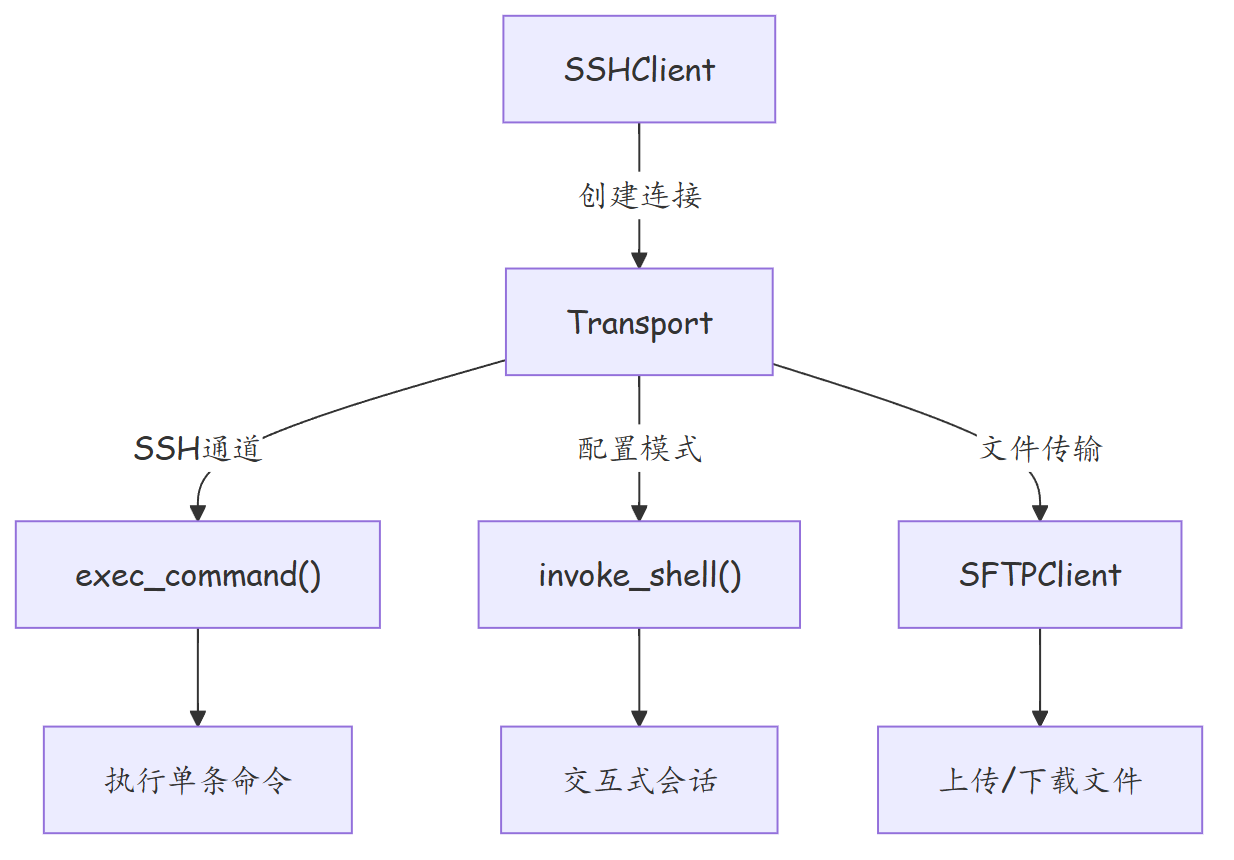
| 核心类 | 职责 | 典型用法 |
|---|---|---|
| SSHClient | 高层SSH客户端,封装主机密钥管理、认证 | 执行显示命令、采集配置 |
| Transport | 底层SSH传输层,支持端口转发等高级功能 | 复杂场景、端口跳转 |
| SFTPClient | SFTP协议文件传输 | 配置文件上传、日志下载 |
| AutoAddPolicy | 自动添加未知主机密钥 | 批量设备连接时跳过主机密钥确认 |
三、基本连接与命令执行
3.1 SSH密码认证连接
import paramiko
import time
import socket

def ssh_execute(hostname, username, password, command, timeout=60):
    """通过SSH密码认证连接设备并执行命令"""

    # 创建SSH客户端
    client = paramiko.SSHClient()

    # 自动添加未知主机密钥(生产环境应使用WarningPolicy)
    client.set_missing_host_key_policy(paramiko.AutoAddPolicy())

    try:
        # 建立连接
        client.connect(
            hostname=hostname,
            port=22,
            username=username,
            password=password,
            timeout=10,              # 连接超时
            banner_timeout=30,       # Banner超时
            auth_timeout=10          # 认证超时
        )
        print(f"[+] 已连接到 {hostname}")

        # 执行命令
        stdin, stdout, stderr = client.exec_command(command, timeout=timeout)

        # 读取输出
        output = stdout.read().decode('utf-8', errors='replace')
        error = stderr.read().decode('utf-8', errors='replace')

        if error:
            print(f"[-] 错误: {error}")
            return None

        return output

    except paramiko.AuthenticationException:
        print(f"[-] 认证失败: {hostname}")
        return None
    except paramiko.SSHException as e:
        print(f"[-] SSH异常: {e}")
        return None
    except socket.timeout:
        print(f"[-] 连接超时: {hostname}")
        return None
    except Exception as e:
        print(f"[-] 未知错误: {e}")
        return None
    finally:
        client.close()
        print(f"[i] 已断开 {hostname}")


# 使用示例
output = ssh_execute(
    hostname="192.168.1.1",
    username="admin",
    password="H@wa1e123",
    command="display version"
)

if output:
    print(output)
3.2 RSA密钥认证连接
import paramiko

def ssh_with_key(hostname, username, key_path, command):
    """使用RSA私钥认证连接设备"""

    client = paramiko.SSHClient()
    client.set_missing_host_key_policy(paramiko.AutoAddPolicy())

    try:
        # 加载私钥
        private_key = paramiko.RSAKey.from_private_key_file(key_path)

        client.connect(
            hostname=hostname,
            username=username,
            pkey=private_key,        # 使用密钥认证
            timeout=10
        )

        stdin, stdout, stderr = client.exec_command(command)
        return stdout.read().decode('utf-8', errors='replace')

    except paramiko.ssh_exception.AuthenticationException:
        print(f"[-] 密钥认证失败: {hostname}")
    finally:
        client.close()
四、执行多命令与进入配置模式
4.1 批量执行多条命令
def ssh_multi_command(hostname, username, password, commands):
    """连接设备后批量执行多条命令"""

    client = paramiko.SSHClient()
    client.set_missing_host_key_policy(paramiko.AutoAddPolicy())

    try:
        client.connect(hostname=hostname, username=username,
                       password=password, timeout=10)

        results = {}
        for cmd in commands:
            stdin, stdout, stderr = client.exec_command(cmd, timeout=60)
            results[cmd] = stdout.read().decode('utf-8', errors='replace')
            time.sleep(0.5)  # 命令间间隔,避免设备繁忙

        return results

    finally:
        client.close()


# 使用示例
commands = [
    "display version",
    "display ip interface brief",
    "display vlan brief",
    "display current-configuration | include vlan",
]

results = ssh_multi_command("192.168.1.1", "admin", "H@wa1e123", commands)
for cmd, output in results.items():
    print(f"=== {cmd} ===")
    print(output)
    print()
4.2 进入配置模式并下发配置
设备配置模式需要交互式操作(如进入system-view),exec_command无法满足此需求,需使用invoke_shell:
import paramiko
import time

def ssh_config_device(hostname, username, password, config_commands):
    """通过Shell交互进入配置模式并下发配置"""

    client = paramiko.SSHClient()
    client.set_missing_host_key_policy(paramiko.AutoAddPolicy())

    try:
        client.connect(hostname=hostname, username=username,
                       password=password, timeout=10)

        # 创建交互式Shell
        shell = client.invoke_shell()
        time.sleep(1)

        # 清屏
        shell.send("terminal length 0\r")
        time.sleep(0.5)

        # 进入系统视图(以华为VRP为例)
        shell.send("system-view\r")
        time.sleep(1)

        # 逐条下发配置
        for cmd in config_commands:
            shell.send(f"{cmd}\r")
            time.sleep(0.5)

        # 保存配置
        shell.send("return\r")
        time.sleep(0.5)
        shell.send("save force\r")
        time.sleep(2)

        # 读取全部输出
        output = shell.recv(65535).decode('utf-8', errors='replace')
        return output

    finally:
        client.close()


# 使用示例:创建VLAN并配置接口
config_cmds = [
    "vlan batch 200 201 202",
    "interface GigabitEthernet0/0/10",
    "port link-type access",
    "port default vlan 200",
    "description To-Server-Rack-A",
    "quit",
    "interface GigabitEthernet0/0/11",
    "port link-type access",
    "port default vlan 201",
    "description To-Server-Rack-B",
    "quit",
]

output = ssh_config_device("192.168.1.1", "admin", "H@wa123", config_cmds)
print(output)
五、SFTP 文件传输
5.1 上传配置文件到设备
def sftp_upload(hostname, username, password, local_file, remote_path):
    """通过SFTP上传文件到网络设备"""

    transport = paramiko.Transport((hostname, 22))
    transport.connect(username=username, password=password)

    try:
        sftp = paramiko.SFTPClient.from_transport(transport)

        # 上传文件
        sftp.put(local_file, remote_path)
        print(f"[+] 文件已上传: {local_file} -> {remote_path}")

        # 验证文件
        attrs = sftp.stat(remote_path)
        print(f"[i] 远程文件大小: {attrs.st_size} 字节")

        return True

    except Exception as e:
        print(f"[-] 上传失败: {e}")
        return False
    finally:
        sftp.close()
        transport.close()


# 使用示例
sftp_upload("192.168.1.1", "admin", "H@wa123",
            "startup.cfg", "/flash/startup.cfg")
5.2 从设备下载日志
def sftp_download(hostname, username, password, remote_file, local_path):
    """通过SFTP从设备下载文件"""

    transport = paramiko.Transport((hostname, 22))
    transport.connect(username=username, password=password)

    try:
        sftp = paramiko.SFTPClient.from_transport(transport)
        sftp.get(remote_file, local_path)
        print(f"[+] 文件已下载: {remote_file} -> {local_path}")
        return True
    except FileNotFoundError:
        print(f"[-] 远程文件不存在: {remote_file}")
        return False
    finally:
        sftp.close()
        transport.close()
六、设备信息采集实战
6.1 完整采集脚本
import paramiko
import json
import re
from datetime import datetime

class NetworkDeviceCollector:
    """网络设备信息采集器"""

    def __init__(self, hostname, username, password):
        self.hostname = hostname
        self.username = username
        self.password = password
        self.client = None
        self.device_info = {}

    def connect(self):
        """建立SSH连接"""
        self.client = paramiko.SSHClient()
        self.client.set_missing_host_key_policy(paramiko.AutoAddPolicy())
        self.client.connect(
            hostname=self.hostname,
            username=self.username,
            password=self.password,
            timeout=10
        )

    def exec(self, command, timeout=30):
        """执行单条命令"""
        stdin, stdout, stderr = self.client.exec_command(command, timeout=timeout)
        return stdout.read().decode('utf-8', errors='replace')

    def collect_version(self):
        """采集设备版本信息"""
        output = self.exec("display version")
        version_match = re.search(r'VRP\(R\) software, Version (.+)', output)

        self.device_info["version"] = {
            "hostname": re.search(r'^([\w-]+)\s', output, re.M).group(1),
            "vrp_version": version_match.group(1) if version_match else "unknown",
            "uptime": re.search(r'uptime is (.+)', output).group(1)
                     if re.search(r'uptime is (.+)', output) else "unknown",
        }
        return self.device_info["version"]

    def collect_interfaces(self):
        """采集接口状态"""
        output = self.exec("display interface brief")
        interfaces = []

        for line in output.splitlines()[2:]:   # 跳过表头
            if not line.strip():
                continue
            parts = line.split()
            if len(parts) >= 4:
                interfaces.append({
                    "name": parts[0],
                    "physical": parts[1],
                    "protocol": parts[2],
                    "description": " ".join(parts[3:]) if len(parts) > 3 else ""
                })

        self.device_info["interfaces"] = interfaces
        return interfaces

    def collect_vlans(self):
        """采集VLAN信息"""
        output = self.exec("display vlan")
        vlans = re.findall(r'Vlan ID\s*:\s*(\d+)', output)
        self.device_info["vlan_count"] = len(vlans)
        self.device_info["vlans"] = vlans
        return vlans

    def collect_routing_table_summary(self):
        """采集路由表摘要"""
        output = self.exec("display ip routing-table statistics")
        match = re.search(r'Routing Table:\s+(\d+)\s+destinations', output)
        route_count = int(match.group(1)) if match else 0
        self.device_info["route_count"] = route_count
        return route_count

    def save_report(self, filename=None):
        """保存采集报告"""
        if filename is None:
            ts = datetime.now().strftime("%Y%m%d_%H%M%S")
            filename = f"report_{self.hostname}_{ts}.json"

        with open(filename, "w", encoding="utf-8") as f:
            json.dump(self.device_info, f, indent=2, ensure_ascii=False)
        print(f"[+] 报告已保存: {filename}")

    def close(self):
        """关闭连接"""
        if self.client:
            self.client.close()


# 使用示例
collector = NetworkDeviceCollector("192.168.1.1", "admin", "H@wa123")
collector.connect()
collector.collect_version()
collector.collect_interfaces()
collector.collect_vlans()
collector.collect_routing_table_summary()
collector.save_report()
collector.close()
6.2 批量采集多设备
import csv

# 从CSV读取设备清单
devices = []
with open("devices.csv", "r", encoding="utf-8") as f:
    reader = csv.DictReader(f)
    for row in reader:
        devices.append(row)

# 批量采集
for device in devices:
    print(f"\n{'='*60}")
    print(f"正在采集: {device['hostname']} ({device['ip']})")

    try:
        collector = NetworkDeviceCollector(
            device['ip'], device['username'], device['password']
        )
        collector.connect()
        collector.collect_version()
        collector.collect_interfaces()
        collector.collect_vlans()
        collector.save_report()
        collector.close()
        print(f"[+] {device['hostname']} 采集完成")
    except Exception as e:
        print(f"[-] {device['hostname']} 采集失败: {e}")
七、故障案例:Paramiko连接超时排查
7.1 故障现象
批量采集脚本在连接20台设备时,其中3台反复报socket.timeout:
[-] 连接超时: 10.10.20.15
Traceback (most recent call last):
  ...
socket.timeout: timed out
7.2 排查过程
步骤1:确认设备可达性
# 从脚本运行主机ping设备
ping 10.10.20.15
# 正常回复,无丢包
步骤2:手动SSH验证
ssh admin@10.10.20.15
# 能够成功登录,但等待时间长达15秒
步骤3:Wireshark抓包分析 发现SSH三次握手正常,但SSH协商阶段(Key Exchange)持续12秒以上。
步骤4:检查设备SSH配置
# 在设备上查看SSH相关配置
display ssh server configuration

# 发现:
# SSH server authentication timeout: 120 seconds
# SSH server concurrent connections: 10
7.3 根因定位
问题出在脚本并发连接数超过设备SSH并发上限:
- 脚本使用多线程,同时发起30个SSH连接
- 目标设备的ssh server max-concurrent-connections配置为10
- 超出限制的连接被挂起,直至超时
7.4 解决方案
import threading
from concurrent.futures import ThreadPoolExecutor

# 方案1:限制线程池大小
with ThreadPoolExecutor(max_workers=5) as executor:
    futures = [executor.submit(collect_device, dev) for dev in devices]
    for f in futures:
        f.result()

# 方案2:增加超时时间并添加重试
for attempt in range(3):
    try:
        collector.connect()
        break
    except socket.timeout:
        if attempt == 2:
            raise
        time.sleep(5 * (attempt + 1))  # 退避等待
八、总结
| 知识点 | 要点 |
|---|---|
| SSHClient | 高层SSH客户端,适用于执行命令和采集 |
| invoke_shell | 交互式Shell,适用于进入配置模式 |
| SFTPClient | 文件上传下载,适用于配置备份与日志采集 |
| AutoAddPolicy | 批量场景自动接受主机密钥,生产环境慎用 |
| 超时配置 | banner_timeout、auth_timeout、exec_command timeout 需按场景调优 |
| 并发控制 | 线程池控制并发数,避免超出设备SSH连接上限 |
| 异常处理 | 区分AuthenticationException、SSHException、socket.timeout |
思考题
exec_command()和invoke_shell()的本质区别是什么?什么场景下必须使用invoke_shell()?- 如果需要在连接设备后先执行
terminal length 0再执行后续命令,用exec_command()能否做到?为什么? - 设计一个支持"连接重试"和"结果缓存"的设备连接类,要求:连接失败最多重试3次,每次间隔递增;相同命令2分钟内不重复执行。
下篇预告
第304篇:Netmiko 批量执行配置命令。在 Paramiko 之上封装多厂商兼容的CLI会话管理,让批量配置下发更简单、更可靠。