第329篇:网络知识图谱构建与应用
关键词:知识图谱、Neo4j、图数据库、实体关系、网络资产、故障关联、智能检索、根因分析
一、引言
网络运维中涉及的数据极其分散:设备台账在 CMDB 系统、拓扑关系在网管平台、故障案例在工单系统、配置信息在 Git 仓库、告警数据在告警平台。这些异构数据之间的关联关系隐藏在人工经验中,无法被系统自动利用。
知识图谱(Knowledge Graph)通过"实体 - 关系 - 实体"的结构化方式,将分散的信息编织成一张互联的知识网络。在网络运维场景中,知识图谱的核心价值在于:
- 全局关联分析:一条告警可迅速追溯到影响的全部设备和业务
- 智能检索:通过自然语言查询获取跨系统关联信息
- 故障根因推理:基于图谱路径分析定位故障传播链
- 运维知识沉淀:将专家经验转化为可查询的图谱知识
二、网络知识图谱本体设计
2.1 实体类型(Node Labels)
| 实体类型 | 标签 | 核心属性 |
|---|---|---|
| 网络设备 | Device |
name, vendor, model, os_version, role, mgmt_ip, site |
| 接口 | Interface |
name, ip_address, vlan, bandwidth, mtu, status |
| 链路 | Link |
source_port, target_port, bandwidth, state, protocol |
| 协议 | Protocol |
type (BGP/OSPF/ISIS/VRRP), process_id, area |
| 业务 | Service |
name, type (L3VPN/MPLS-TE/SD-WAN), customers |
| 告警 | Alarm |
alarm_id, type, severity, timestamp, description |
| 故障案例 | FaultCase |
case_id, description, root_cause, resolution, timestamp |
| IP 地址 | IPAddress |
address, prefix, pool, status, assigned_to |
| 机房/站点 | Site |
name, location, tier, power_capacity |
| 文档 | Document |
title, url, type (manual/rfc/faq), tags |
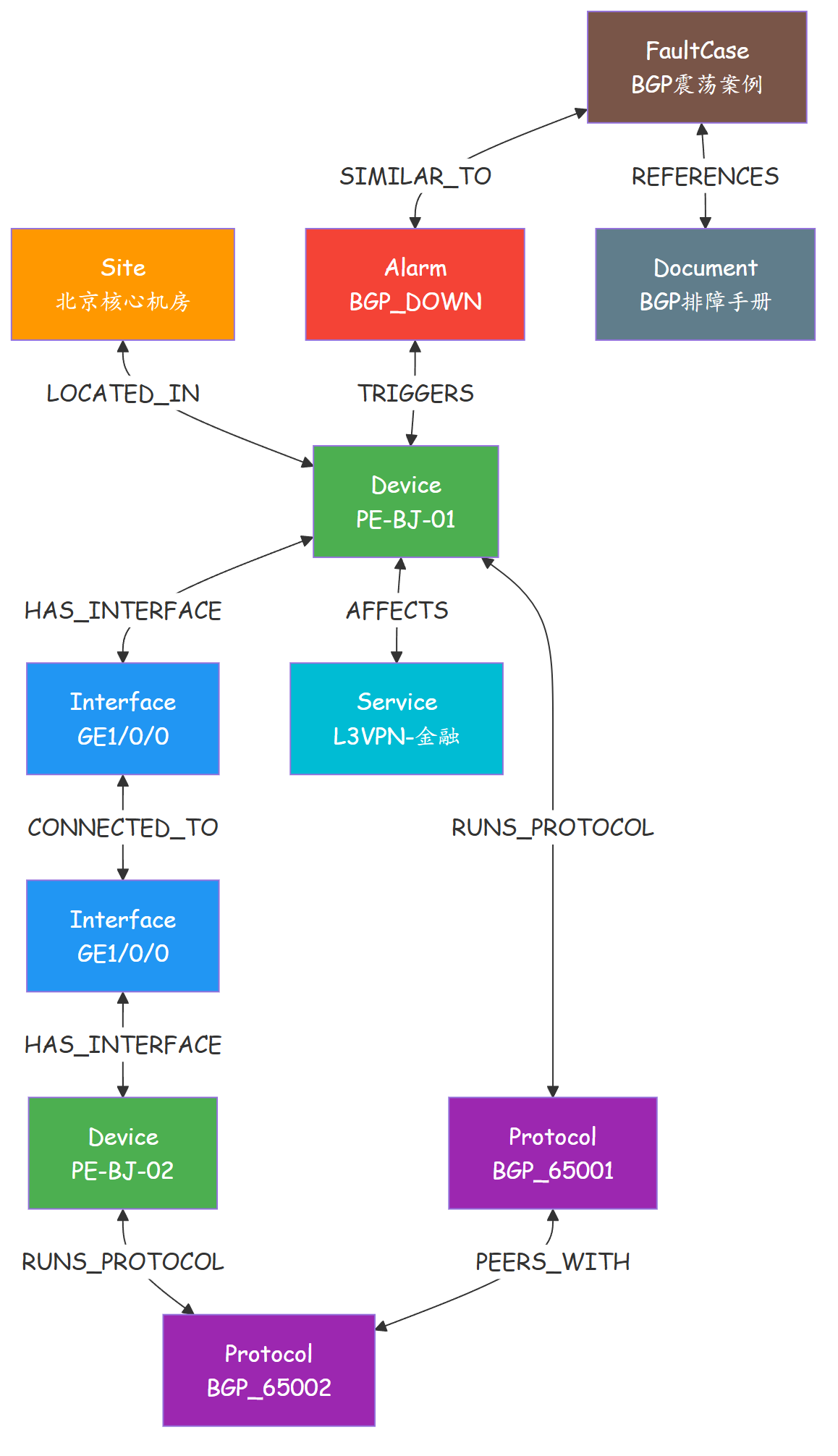
2.2 关系类型(Relationship Types)
| 关系类型 | 方向 | 含义 | 示例 |
|---|---|---|---|
LOCATED_IN |
Device → Site | 设备位于某站点 | PE-BJ-01 → 北京核心机房 |
HAS_INTERFACE |
Device → Interface | 设备拥有某接口 | PE-BJ-01 → GE1/0/0 |
CONNECTED_TO |
Interface → Interface | 接口间直连 | GE1/0/0 ↔ GE1/0/0 |
RUNS_PROTOCOL |
Device → Protocol | 设备运行某协议 | PE-BJ-01 → BGP_65001 |
PEERS_WITH |
Protocol → Protocol | 协议对等关系 | BGP_PE1 ↔ BGP_PE2 |
SUPPORTS |
Service → Device | 业务经过某设备 | L3VPN-A → PE-BJ-01 |
TRIGGERS |
Alarm → Device | 告警关联设备 | ALM-001 → PE-BJ-01 |
AFFECTS |
Device → Service | 设备故障影响业务 | PE-BJ-01 → L3VPN-A |
SIMILAR_TO |
FaultCase → FaultCase | 故障案例相似 | Case-101 → Case-203 |
REFERENCES |
FaultCase → Document | 案例参考文档 | Case-101 → Huawei_BGP_Guide |
2.3 图谱可视化示意
三、知识图谱构建流程
3.1 数据抽取(Extraction)
# kg/extractors.py
import json
import yaml
import re

def extract_from_cmdb(cmdb_api_url):
    """从 CMDB 系统抽取设备台账"""
    import requests
    response = requests.get(f"{cmdb_api_url}/devices")
    devices = response.json()['data']

    nodes = []
    for dev in devices:
        nodes.append({
            'label': 'Device',
            'properties': {
                'name': dev['hostname'],
                'vendor': dev.get('vendor', 'unknown'),
                'model': dev.get('model', 'unknown'),
                'role': dev.get('role', 'unknown'),
                'mgmt_ip': dev.get('management_ip'),
                'os_version': dev.get('os_version'),
                'site': dev.get('site_id')
            }
        })
    return nodes

def extract_from_topology(topology_file):
    """从拓扑数据抽取连接关系"""
    with open(topology_file) as f:
        topology = json.load(f)

    nodes = []
    relationships = []

    for link in topology.get('edges', []):
        src_intf = f"{link['source']}::{link['source_port']}"
        dst_intf = f"{link['target']}::{link['target_port']}"

        # 创建接口节点
        nodes.append({
            'label': 'Interface',
            'properties': {
                'name': src_intf,
                'device': link['source'],
                'port': link['source_port']
            }
        })
        nodes.append({
            'label': 'Interface',
            'properties': {
                'name': dst_intf,
                'device': link['target'],
                'port': link['target_port']
            }
        })

        # 创建连接关系
        relationships.append({
            'type': 'CONNECTED_TO',
            'source': src_intf,
            'target': dst_intf,
            'properties': {
                'bandwidth': link.get('bandwidth', '1G'),
                'state': link.get('state', 'up'),
                'protocol': link.get('protocol', 'lldp')
            }
        })

        # 设备-接口关系
        relationships.append({
            'type': 'HAS_INTERFACE',
            'source': link['source'],
            'target': src_intf,
            'properties': {}
        })
        relationships.append({
            'type': 'HAS_INTERFACE',
            'source': link['target'],
            'target': dst_intf,
            'properties': {}
        })

    return nodes, relationships

def extract_from_alarm_system(alm_file):
    """从告警系统抽取告警数据"""
    with open(alm_file) as f:
        alarms = json.load(f)

    nodes = []
    relationships = []

    for alarm in alarms:
        alarm_id = alarm['alarm_id']
        nodes.append({
            'label': 'Alarm',
            'properties': {
                'alarm_id': alarm_id,
                'type': alarm['type'],
                'severity': alarm['severity'],
                'description': alarm['description'],
                'timestamp': alarm['timestamp'],
                'acknowledged': alarm.get('acknowledged', False)
            }
        })

        # 告警 → 设备
        for affected_device in alarm.get('affected_devices', []):
            relationships.append({
                'type': 'TRIGGERS',
                'source': alarm_id,
                'target': affected_device,
                'properties': {
                    'timestamp': alarm['timestamp']
                }
            })

    return nodes, relationships
3.2 Neo4j 批量导入
# kg/neo4j_loader.py
from neo4j import GraphDatabase

class KnowledgeGraphLoader:
    def __init__(self, uri, user, password):
        self.driver = GraphDatabase.driver(uri, auth=(user, password))

    def upsert_device(self, name, **kwargs):
        """插入/更新设备节点"""
        query = """
        MERGE (d:Device {name: $name})
        SET d += $props
        RETURN d.name
        """
        with self.driver.session() as session:
            result = session.run(query, name=name, props=kwargs)
            return result.single()

    def upsert_relationship(self, rel_type, src_label, src_key,
                           tgt_label, tgt_key, **props):
        """插入/更新关系"""
        query = f"""
        MATCH (a:{src_label} {{{src_key}}})
        MATCH (b:{tgt_label} {{{tgt_key}}})
        MERGE (a)-[r:{rel_type}]->(b)
        SET r += $props
        RETURN type(r), id(a), id(b)
        """
        with self.driver.session() as session:
            result = session.run(query, props=props)
            return result.single()

    def bulk_load(self, nodes, relationships):
        """批量加载节点和关系"""
        with self.driver.session() as session:
            # 加载节点
            for node in nodes:
                props = node['properties']
                name = props.get('name', props.get('alarm_id', ''))
                session.run(
                    f"MERGE (n:{node['label']} {{name: $name}}) "
                    f"SET n += $props",
                    name=name, props=props
                )

            # 加载关系
            for rel in relationships:
                session.run(
                    f"""
                    MATCH (a {{name: $src}})
                    MATCH (b {{name: $tgt}})
                    MERGE (a)-[r:{rel['type']}]->(b)
                    SET r += $props
                    """,
                    src=rel['source'], tgt=rel['target'],
                    props=rel.get('properties', {})
                )

    def close(self):
        self.driver.close()

# 使用示例
loader = KnowledgeGraphLoader(
    "bolt://localhost:7687", "neo4j", "password"
)

# 从多个数据源抽取并加载
cmdb_nodes = extract_from_cmdb("http://cmdb.example.com/api")
topo_nodes, topo_rels = extract_from_topology("topology.json")
alarm_nodes, alarm_rels = extract_from_alarm_system("alarms.json")

loader.bulk_load(cmdb_nodes + topo_nodes + alarm_nodes,
                 topo_rels + alarm_rels)
3.3 Cypher 查询示例
// 查询 1: 某设备受影响的全部业务
MATCH (d:Device {name: 'PE-BJ-01'})-[:AFFECTS*1..3]->(s:Service)
RETURN s.name AS 业务名称, s.type AS 业务类型

// 查询 2: 某告警影响的设备链路
MATCH (a:Alarm {alarm_id: 'ALM-20260905-001'})
  -[:TRIGGERS]->(d:Device)
  -[:HAS_INTERFACE]->(i:Interface)
  -[:CONNECTED_TO]->(j:Interface)
  <-[:HAS_INTERFACE]-(peer:Device)
RETURN a.description AS 告警描述,
       d.name AS 故障设备,
       peer.name AS 对端设备,
       i.name AS 本地接口,
       j.name AS 对端接口

// 查询 3: 查找相似故障案例
MATCH (current:Alarm {type: 'BGP_SESSION_DOWN'})
  -[:TRIGGERS]->(d:Device)
MATCH (case:FaultCase)-[:SIMILAR_TO]->(similar:Alarm)
WHERE similar.type = current.type
RETURN case.case_id, case.description, case.root_cause,
       case.resolution

// 查询 4: 设备间的多跳路径
MATCH path = (d1:Device {name: 'PE-BJ-01'})
  -[:HAS_INTERFACE]->(:Interface)-[:CONNECTED_TO]-
  (:Interface)-[:HAS_INTERFACE]->(d2:Device)
WHERE d1 <> d2
RETURN [n IN nodes(path) WHERE n:Device | n.name] AS 路径

// 查询 5: 站点的设备分布
MATCH (s:Site)<-[:LOCATED_IN]-(d:Device)
RETURN s.name AS 站点,
       count(d) AS 设备数量,
       collect(d.role) AS 设备角色
ORDER BY 设备数量 DESC
四、知识图谱应用场景
4.1 故障影响分析(Impact Analysis)
当一台设备发生故障时,通过图谱快速定位受影响的业务范围:
# kg/impact_analysis.py

def analyze_impact(device_name):
    """分析设备故障的影响范围"""
    query = """
    MATCH (d:Device {name: $device_name})
    OPTIONAL MATCH (d)-[:AFFECTS*1..5]->(s:Service)
    OPTIONAL MATCH (d)-[:HAS_INTERFACE]->(:Interface)
                    -[:CONNECTED_TO]->(:Interface)
                    <-[:HAS_INTERFACE]-(peer:Device)
    OPTIONAL MATCH (d)-[:LOCATED_IN]->(site:Site)
    RETURN d.name AS device,
           d.role AS device_role,
           collect(DISTINCT s.name) AS affected_services,
           collect(DISTINCT peer.name) AS connected_devices,
           site.name AS site,
           d.vip_level AS vip_level
    """

    with loader.driver.session() as session:
        result = session.run(query, device_name=device_name)
        record = result.single()

        return {
            'device': record['device'],
            'role': record['device_role'],
            'affected_services': record['affected_services'] or [],
            'connected_devices': record['connected_devices'] or [],
            'site': record['site'],
            'vip_level': record['vip_level'],
            'impact_score': calculate_impact_score(record)
        }

def calculate_impact_score(record):
    """计算影响评分"""
    score = 0
    # 服务数量加权
    score += len(record.get('affected_services', [])) * 10
    # VIP 等级加权
    vip_weights = {'platinum': 30, 'gold': 20, 'silver': 10, 'standard': 5}
    score += vip_weights.get(record.get('vip_level', 'standard'), 5)
    # 设备角色加权
    role_weights = {'PE': 25, 'P': 20, 'CE': 10, 'AG': 5}
    score += role_weights.get(record.get('role', ''), 5)
    return min(score, 100)
4.2 智能运维问答
# kg/smart_qa.py

NATURAL_LANGUAGE_TO_CYPHER = {
    r"(?i)哪些设备在(.+)":
        'MATCH (s:Site {name: "{site}"})<-[:LOCATED_IN]-(d:Device) '
        'RETURN d.name, d.role, d.vendor',

    r"(?i)(.+)上运行哪些协议":
        'MATCH (d:Device {name: "{device}"})-[:RUNS_PROTOCOL]->(p:Protocol) '
        'RETURN p.type, p.process_id, p.area',

    r"(?i)(.+)连接了哪些设备":
        'MATCH (d:Device {name: "{device}"})'
        '-[:HAS_INTERFACE]->(:Interface)-[:CONNECTED_TO]-'
        '(:Interface)-[:HAS_INTERFACE]->(peer:Device) '
        'RETURN DISTINCT peer.name, peer.role',

    r"(?i)(.+)影响了哪些业务":
        'MATCH (d:Device {name: "{device}"})-[:AFFECTS*1..3]->(s:Service) '
        'RETURN DISTINCT s.name, s.type'
}

def smart_query(question):
    """自然语言查询知识图谱"""
    for pattern, cypher_template in NATURAL_LANGUAGE_TO_CYPHER.items():
        match = re.match(pattern, question)
        if match:
            entity = match.group(1)
            cypher = cypher_template.format(site=entity, device=entity)

            with loader.driver.session() as session:
                result = session.run(cypher)
                return [dict(r) for r in result]

    return {"error": "无法识别的查询,请尝试: '哪些设备在XX', 'XX连接了哪些设备'"}

# 示例调用
print(smart_query("PE-BJ-01连接了哪些设备"))
print(smart_query("哪些设备在北京核心机房"))
4.3 历史故障案例推荐
# kg/fault_recommendation.py

def recommend_similar_cases(current_fault):
    """推荐相似历史故障案例"""
    query = """
    MATCH (case:FaultCase)-[:SIMILAR_TO]->(alarm:Alarm)
    WHERE alarm.type = $fault_type
    OPTIONAL MATCH (case)-[:REFERENCES]->(doc:Document)
    RETURN case.case_id AS case_id,
           case.description AS description,
           case.root_cause AS root_cause,
           case.resolution AS resolution,
           case.severity AS severity,
           collect(DISTINCT doc.title) AS reference_docs,
           case.timestamp AS occurred_at
    ORDER BY occurred_at DESC
    LIMIT 10
    """

    with loader.driver.session() as session:
        result = session.run(query, fault_type=current_fault['type'])
        cases = []
        for record in result:
            cases.append(dict(record))
        return cases
4.4 知识图谱与大语言模型(LLM)联动
将知识图谱作为 LLM 的外部知识库,实现"图谱检索 + 大模型推理"的混合智能诊断:
# kg/llm_graph_agent.py
import re
from openai import OpenAI

class GraphEnhancedLLMAgent:
    """图谱增强的 LLM 智能运维 Agent"""

    def __init__(self, neo4j_loader, openai_client=None):
        self.loader = neo4j_loader
        self.client = openai_client or OpenAI()

    def retrieve_graph_context(self, device_name, context_depth=2):
        """从知识图谱检索设备的上下文信息"""
        query = f"""
        MATCH path = (d:Device {{name: $device}})
          -[*1..{context_depth}]-(related)
        WHERE related <> d
        RETURN path
        LIMIT 50
        """
        with self.loader.driver.session() as session:
            result = session.run(query, device=device_name)
            nodes = set()
            relationships = []
            for record in result:
                for node in record['path'].nodes:
                    nodes.add(f"{node.labels[0]}({node['name']}): {dict(node)}")
                for rel in record['path'].relationships:
                    src = rel.start_node['name']
                    tgt = rel.end_node['name']
                    relationships.append(f"{src} -[{rel.type}]-> {tgt}")
            return {
                'nodes': list(nodes),
                'relationships': relationships[:20]  # 限制上下文长度
            }

    def diagnose_with_graph(self, question, device_name=None):
        """基于图谱上下文辅助 LLM 进行故障诊断"""
        # Step 1: 从图谱检索相关上下文
        graph_context = ""
        if device_name:
            context = self.retrieve_graph_context(device_name)
            graph_context = (
                f"## 图谱检索结果\n"
                f"关联节点: {', '.join(context['nodes'][:10])}\n"
                f"关联关系: {', '.join(context['relationships'][:10])}"
            )

        # Step 2: 构建 Prompt
        prompt = f"""
你是一个网络运维专家。请根据以下信息回答问题。

{graph_context}

## 用户问题
{question}

## 回答要求
1. 结合图谱中的设备关系和业务知识
2. 给出可能的根因分析
3. 提供排查步骤和修复建议
"""
        # Step 3: 调用 LLM
        response = self.client.chat.completions.create(
            model="gpt-4",
            messages=[{"role": "user", "content": prompt}],
            temperature=0.3
        )
        return response.choices[0].message.content
4.5 知识图谱数据质量评估
| 评估维度 | 指标 | 计算方法 | 目标值 |
|---|---|---|---|
| 实体覆盖率 | 设备入库率 | 图谱设备数 / CMDB设备数 | ≥95% |
| 关系完整性 | 链路发现率 | 图谱链路数 / 实际物理链路数 | ≥90% |
| 数据新鲜度 | 最近更新时间 | max(节点last_update) 距今 | ≤24h |
| 关联深度 | 平均关联路径 | 所有设备对最短路径的平均长度 | ≤3跳 |
| 孤儿节点率 | 孤立设备占比 | 度数为0的节点数 / 总节点数 | ≤5% |
def evaluate_graph_quality(loader):
    """知识图谱质量评估"""
    with loader.driver.session() as session:
        # 总节点数
        total = session.run("MATCH (n) RETURN count(n) AS c").single()['c']
        # 总关系数
        total_rels = session.run("MATCH ()-[r]->() RETURN count(r) AS c").single()['c']
        # 孤儿节点
        orphans = session.run(
            "MATCH (n) WHERE size((n)--()) = 0 RETURN count(n) AS c"
        ).single()['c']
        # Device 节点数
        devices = session.run("MATCH (d:Device) RETURN count(d) AS c").single()['c']
        # Device 关系数
        device_rels = session.run(
            "MATCH (d:Device)-[r]->() RETURN count(r) AS c"
        ).single()['c']

        return {
            'total_nodes': total,
            'total_relationships': total_rels,
            'device_count': devices,
            'device_relationships': device_rels,
            'orphan_count': orphans,
            'orphan_rate': f"{orphans/total*100:.1f}%" if total else "N/A",
            'avg_degree': f"{total_rels/total:.2f}" if total else "N/A"
        }
五、总结
| 维度 | 传统运维 | 知识图谱赋能 |
|---|---|---|
| 故障定位 | 逐台设备排查,耗时 30+ 分钟 | 图谱路径分析,秒级定位 |
| 影响分析 | 人工梳理设备-业务关系 | 自动遍历影响链路 |
| 案例检索 | 工单系统关键词搜索 | 语义关联 + 图谱相似推荐 |
| 知识沉淀 | 文档散落各处 | 结构化存储,持续积累 |
| 新人培训 | 老带新模式,效率低 | 图谱查询 + 智能问答辅助 |
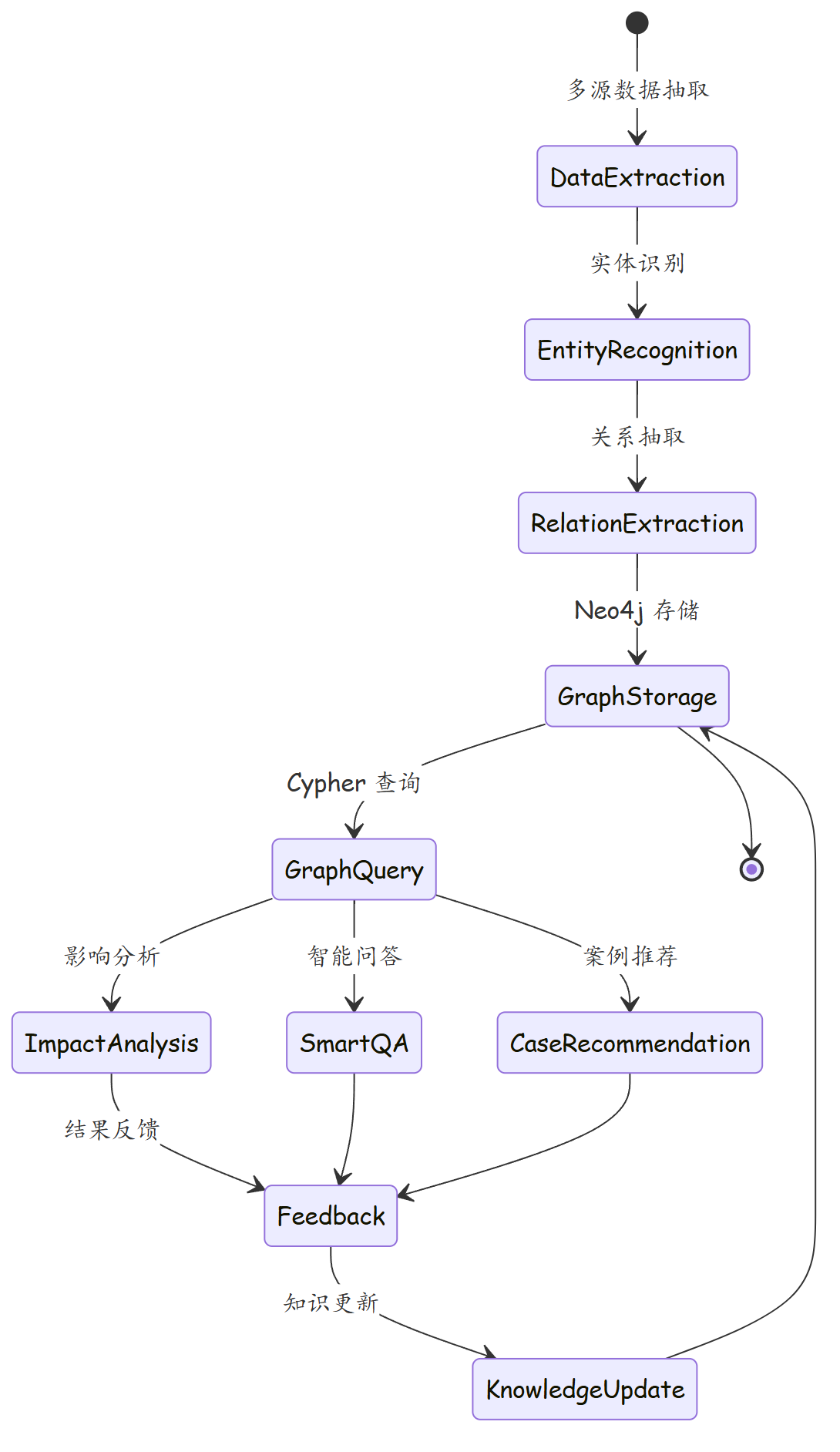
知识图谱构建与应用的闭环
故障案例:知识图谱加速重大故障处置
某运营商核心路由器故障,影响 12 个 L3VPN 业务和 3 个 SD-WAN 租户。使用知识图谱后:
- 秒级影响分析:查询
PE-BJ-01的AFFECTS关系,立即获得受影响的全部 15 个业务列表 - 根因定位:通过告警-设备-链路路径分析,定位到光模块故障导致的接口 Down
- 案例推荐:图谱匹配到 3 个相似历史案例,其中案例 Case-0892 的解决方案完全适用
- 处置效率:从告警到恢复,传统方式需 45 分钟,使用知识图谱后缩短至 12 分钟
思考题
- 知识图谱的构建和维护成本较高,在什么规模的网络中引入知识图谱才具有经济合理性?
- 如何将知识图谱与大语言模型(LLM)结合,实现更智能的网络运维问答和故障诊断?
下篇预告:第330篇《AI Ops:智能网络运维的演进之路》——从自动化到智能化的网络运维演进,展望 AIOps 与生成式 AI 融合的未来。