第328篇:大模型辅助网络故障诊断实践
关键词:大语言模型、LLM、故障诊断、根因分析、Prompt Engineering、RAG、向量数据库、网络运维
一、引言
大语言模型(Large Language Model, LLM)的出现为网络故障诊断带来了革命性的变化。传统故障排查高度依赖工程师个人经验,排障过程往往是"看告警 → 猜原因 → 试操作 → 验证"的循环。LLM 凭借其强大的自然语言理解和推理能力,可以在以下环节辅助运维:
- 告警解读:将原始告警信息转化为人类可读的故障描述
- 根因推断:结合设备日志、拓扑信息和历史案例,推断故障根因
- 方案生成:基于故障类型自动生成处置建议和配置修复方案
- 知识库问答:回答网络协议、设备命令、排障流程等技术问题
但 LLM 并非万能,它在网络运维中的定位是"辅助工具"而非"替代专家"。正确使用 LLM 的关键在于:提供准确的结构化上下文、设计合理的 Prompt 模板、结合 RAG(检索增强生成)确保回答准确性。
二、LLM 辅助故障诊断架构
2.1 整体架构
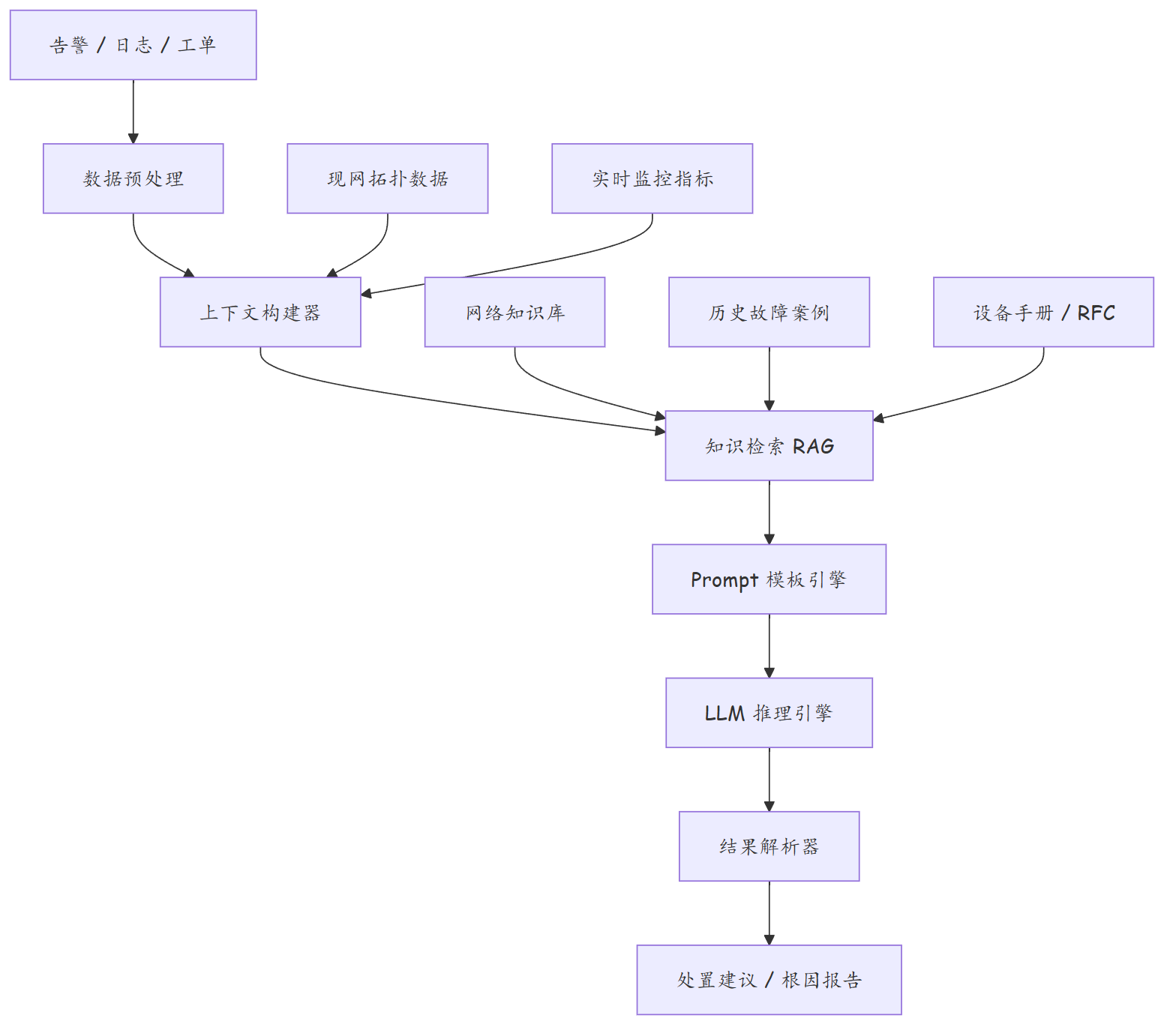
2.2 核心组件说明
| 组件 | 职责 | 技术选型 |
|---|---|---|
| 数据预处理 | 清洗、归一化原始告警和日志 | Python + 正则表达式 |
| 上下文构建器 | 组装与故障相关的结构化数据 | YAML/JSON 模板 |
| 知识检索(RAG) | 从知识库检索相关文档片段 | LangChain + ChromaDB |
| Prompt 模板引擎 | 将上下文注入 LLM 提示词 | Jinja2 / Prompt 模板 |
| LLM 推理引擎 | 调用大模型 API 进行推理 | OpenAI / Claude / 通义千问 |
| 结果解析器 | 将 LLM 输出解析为结构化建议 | JSON Schema 约束 |
三、Prompt 工程实践
3.1 故障诊断 Prompt 模板
# llm/prompt_templates.py

FAULT_DIAGNOSIS_PROMPT = """
你是一位资深网络故障诊断专家,拥有 15 年以上网络运维经验,精通华为、Cisco、Juniper 等厂商设备。

## 故障上下文

### 设备信息
- 设备名称: {{ device_name }}
- 厂商型号: {{ device_model }}
- 软件版本: {{ software_version }}

### 告警信息
{% for alert in alerts %}
- 告警ID: {{ alert.id }}
- 告警级别: {{ alert.severity }}
- 告警类型: {{ alert.type }}
- 告警内容: {{ alert.message }}
- 触发时间: {{ alert.timestamp }}
{% endfor %}

### 相关日志
{{ relevant_logs }}
### 拓扑信息
- 该设备的上行链路: {{ upstream_links }}
- 该设备的下行链路: {{ downstream_links }}
- 邻接设备状态: {{ neighbor_status }}

### 监控指标
- CPU 使用率: {{ cpu_usage }}%
- 内存使用率: {{ memory_usage }}%
- 接口流量: {{ interface_traffic }}

## 你的任务

请基于以上信息,按以下格式输出诊断结果:

1. **故障现象总结**(1-2句话概括当前问题)
2. **根因分析**(分析可能导致此故障的 3 个原因,按可能性排序)
3. **验证步骤**(给出 3-5 条 `display` 命令用于验证你的分析)
4. **处置建议**(针对最可能的根因给出具体修复步骤)
5. **风险评估**(执行修复操作的风险等级及回滚方案)

请确保你的分析基于提供的实际数据,不要臆造信息。如果信息不足,请明确指出需要补充哪些信息。
"""
3.2 调用 LLM API
# llm/diagnosis_engine.py
import json
import openai

class NetworkDiagnosisEngine:
    def __init__(self, api_key, model="gpt-4-turbo"):
        self.client = openai.OpenAI(api_key=api_key)
        self.model = model

    def diagnose(self, fault_context):
        """执行故障诊断"""
        # 渲染 Prompt
        from jinja2 import Template
        prompt = Template(FAULT_DIAGNOSIS_PROMPT).render(**fault_context)

        # 调用 LLM
        response = self.client.chat.completions.create(
            model=self.model,
            messages=[
                {
                    "role": "system",
                    "content": (
                        "你是一位资深网络故障诊断专家。你的回答必须基于提供的"
                        "实际数据,不要臆造信息。输出格式严格遵循 JSON 结构。"
                    )
                },
                {"role": "user", "content": prompt}
            ],
            temperature=0.2,          # 低温度确保输出稳定
            max_tokens=2000,
            response_format={
                "type": "json_schema",
                "json_schema": {
                    "name": "diagnosis_result",
                    "schema": {
                        "type": "object",
                        "properties": {
                            "summary": {"type": "string"},
                            "root_causes": {
                                "type": "array",
                                "items": {
                                    "type": "object",
                                    "properties": {
                                        "cause": {"type": "string"},
                                        "probability": {"type": "number"},
                                        "evidence": {"type": "string"}
                                    }
                                }
                            },
                            "verification_commands": {
                                "type": "array",
                                "items": {"type": "string"}
                            },
                            "remediation": {
                                "type": "object",
                                "properties": {
                                    "steps": {
                                        "type": "array",
                                        "items": {"type": "string"}
                                    },
                                    "risk_level": {
                                        "type": "string",
                                        "enum": ["low", "medium", "high"]
                                    },
                                    "rollback_plan": {"type": "string"}
                                }
                            }
                        },
                        "required": ["summary", "root_causes",
                                   "verification_commands", "remediation"]
                    }
                }
            }
        )

        # 解析结果
        result = json.loads(response.choices[0].message.content)
        return result

    def generate_repair_script(self, diagnosis, device_info):
        """根据诊断结果生成修复脚本"""
        repair_prompt = f"""
基于以下故障诊断结果,为 {{device_info['os']}} 设备生成修复配置命令:

诊断结果: {json.dumps(diagnosis, indent=2, ensure_ascii=False)}
设备信息: {json.dumps(device_info, indent=2, ensure_ascii=False)}

请输出:
1. 修复前的备份命令
2. 修复配置命令
3. 修复后的验证命令
4. 回滚命令

以设备 CLI 命令格式输出。
"""
        # 调用 LLM 生成修复脚本
        response = self.client.chat.completions.create(
            model=self.model,
            messages=[
                {"role": "system", "content": "你是一个网络配置生成专家"},
                {"role": "user", "content": repair_prompt}
            ],
            temperature=0.1
        )
        return response.choices[0].message.content
四、RAG 检索增强生成
4.1 知识库构建
# llm/knowledge_base.py
from langchain.text_splitter import RecursiveCharacterTextSplitter
from langchain.embeddings import OpenAIEmbeddings
from langchain.vectorstores import Chroma
import fitz  # PyMuPDF for PDF parsing

def build_knowledge_base(documents_dir):
    """
    从 PDF/Markdown/TXT 文档构建向量知识库
    包含:设备手册、故障案例、RFC 文档、排障手册
    """
    import os

    texts = []
    metadatas = []

    for root, dirs, files in os.walk(documents_dir):
        for file in files:
            filepath = os.path.join(root, file)

            if file.endswith('.pdf'):
                # 解析 PDF
                doc = fitz.open(filepath)
                text = '\n'.join(page.get_text() for page in doc)
            elif file.endswith(('.md', '.txt')):
                with open(filepath, 'r', encoding='utf-8') as f:
                    text = f.read()
            else:
                continue

            # 文本分割
            splitter = RecursiveCharacterTextSplitter(
                chunk_size=1000,
                chunk_overlap=200,
                separators=["\n\n", "\n", "。", "!"]
            )
            chunks = splitter.split_text(text)

            for i, chunk in enumerate(chunks):
                texts.append(chunk)
                metadatas.append({
                    "source": file,
                    "chunk_index": i,
                    "path": filepath
                })

    # 构建向量索引
    embeddings = OpenAIEmbeddings()
    vectorstore = Chroma.from_texts(
        texts, embeddings, metadatas=metadatas,
        persist_directory="./kb_vectorstore"
    )
    vectorstore.persist()

    return vectorstore

def retrieve_relevant_docs(query, vectorstore, top_k=5):
    """检索与查询相关的文档片段"""
    results = vectorstore.similarity_search_with_score(query, k=top_k)
    docs = []
    for doc, score in results:
        docs.append({
            "content": doc.page_content,
            "source": doc.metadata.get("source", "unknown"),
            "relevance_score": round(1 - score, 3)
        })
    return docs
4.2 RAG 增强诊断
# llm/rag_diagnosis.py

RAG_ENHANCED_PROMPT = """
你是一位资深网络故障诊断专家。

## 故障描述
{{ fault_description }}

## 告警与日志
{{ alerts_and_logs }}

## 检索到的相关知识(来自知识库)
{% for doc in related_docs %}
### 来源: {{ doc.source }}(相关度: {{ doc.relevance_score }})
{{ doc.content }}
{% endfor %}

## 任务
综合以上所有信息,给出故障诊断报告。优先参考检索到的知识中的处置方案,
并结合当前故障的具体情况进行调整。
"""

def rag_diagnose(fault_description, alerts, vectorstore):
    """RAG 增强的故障诊断"""
    # 1. 检索相关知识
    related_docs = retrieve_relevant_docs(fault_description, vectorstore)

    # 2. 组装 Prompt
    from jinja2 import Template
    prompt = Template(RAG_ENHANCED_PROMPT).render(
        fault_description=fault_description,
        alerts_and_logs=json.dumps(alerts, indent=2, ensure_ascii=False),
        related_docs=related_docs
    )

    # 3. 调用 LLM
    response = client.chat.completions.create(
        model="gpt-4-turbo",
        messages=[
            {"role": "system",
             "content": "你是网络故障诊断专家,基于检索到的知识给出诊断"},
            {"role": "user", "content": prompt}
        ],
        temperature=0.2
    )

    return response.choices[0].message.content
五、实际案例分析
5.1 BGP 会话震荡诊断
{
  "input": {
    "device_name": "PE-BJ-01",
    "alerts": [
      {
        "id": "ALM-20260905-001",
        "severity": "major",
        "type": "BGP_SESSION_DOWN",
        "message": "BGP peer 10.1.1.2 session went down",
        "timestamp": "2026-09-05T03:15:22Z"
      },
      {
        "id": "ALM-20260905-002",
        "severity": "major",
        "type": "BGP_SESSION_UP",
        "message": "BGP peer 10.1.1.2 session came up",
        "timestamp": "2026-09-05T03:15:47Z"
      },
      {
        "id": "ALM-20260905-003",
        "severity": "major",
        "type": "BGP_SESSION_DOWN",
        "message": "BGP peer 10.1.1.2 session went down",
        "timestamp": "2026-09-05T03:16:01Z"
      }
    ],
    "cpu_usage": 45,
    "memory_usage": 62,
    "interface_errors": 0
  },
  "llm_output": {
    "summary": "PE-BJ-01 与对端 10.1.1.2 的 BGP 会话在 50 秒内发生了两次震荡(Down-Up-Down),属于典型的 BGP Flapping。",
    "root_causes": [
      {
        "cause": "底层链路不稳定导致 TCP 连接断开",
        "probability": 0.6,
        "evidence": "BGP 会话震荡间隔约 25-30 秒,符合 keepalive 周期,接口无错误计数,但链路可能存在瞬断"
      },
      {
        "cause": "BGP Timer 参数不匹配",
        "probability": 0.25,
        "evidence": "需要检查本端与对端的 keepalive/holdtime 配置是否一致"
      },
      {
        "cause": "路由震荡(route flapping)触发 BGP 会话重置",
        "probability": 0.15,
        "evidence": "需要检查 BGP dampening 配置和路由表更新频率"
      }
    ],
    "verification_commands": [
      "display bgp peer 10.1.1.2 verbose",
      "display interface | include GigabitEthernet",
      "display bgp routing-table statistics",
      "display ip routing-table statistics",
      "display current-configuration | include dampening"
    ],
    "remediation": {
      "steps": [
        "1. 执行 display bgp peer 10.1.1.2 verbose 确认震荡原因码",
        "2. 检查两端链路,执行 display interface 查看 CRC 错误和丢包",
        "3. 如为链路问题,更换光模块或光纤",
        "4. 如链路正常,配置 BGP Timer 保活检测:peer 10.1.1.2 timer 30 90",
        "5. 启用 BGP 路由抑制:bgp dampening"
      ],
      "risk_level": "low",
      "rollback_plan": "恢复原 BGP Timer 配置:peer 10.1.1.2 undo timer"
    }
  }
}
5.2 LLM 辅助诊断效果评估
| 指标 | 人工排障 | LLM 辅助排障 | 改善 |
|---|---|---|---|
| 首次诊断时间 | 30-60 分钟 | 1-3 分钟 | 95%+ |
| 根因定位准确率 | 70%(依赖经验) | 85%+(有 RAG 增强) | 15pp |
| 处置方案完整度 | 依赖个人知识 | 结构化输出 | 显著提升 |
| 新手工程师效率 | 极低 | 接近中级水平 | 大幅提升 |
| 知识沉淀 | 散落在个人脑中 | 知识库持续积累 | 组织级提升 |
六、GitOps 网络配置管理与变更审计
5.1 GitOps 工作流设计

5.2 PR/MR 审核流程
# .github/pull_request_template.md
# PR 审核模板(GitHub)

## 变更概述

**变更类型**: □ 新增配置  □ 修改配置  □ 删除配置  □ 回滚
**关联需求**: #ISSUE_NUMBER
**风险评估**: □ 低风险  □ 中风险  □ 高风险

## 变更范围

| 设备 | 变更类型 | 影响评估 |
|------|---------|---------|
| PE-BJ-01 | BGP Timer 调整 | 影响 BGP 会话建立时间 |
| PE-BJ-02 | BGP Timer 调整 | 影响 BGP 会话建立时间 |

## 变更内容

```diff
--- a/configs/production/PE-BJ-01.yaml
+++ b/configs/production/PE-BJ-01.yaml
@@ -15,6 +15,6 @@ bgp:
     peers:
       - ip: 10.1.1.2
         remote_as: 65002
-        timer_keepalive: 30
-        timer_holdtime: 90
+        timer_keepalive: 10
+        timer_holdtime: 30
验证清单
- [ ] YAML 语法检查通过
- [ ] Batfish 静态分析通过
- [ ] 仿真环境 BGP 会话正常
- [ ] 回滚方案已测试
- [ ] 对端设备配置已同步
回滚方案
- 执行
git revert回滚提交 - ArgoCD 自动检测到 main 分支变更并重新部署
- 验证 BGP Timer 恢复为 30/90
审核要求
- 至少 1 名网络架构师审核
- 至少 1 名变更经理审核
- CI Pipeline 必须全部通过
### 5.3 自动化测试脚本

```python
#!/usr/bin/env python3
# tests/gitops_test_suite.py
"""
GitOps 自动化测试套件
在 PR/MR 合并前自动执行
"""
import pytest
import yaml
import json
from pathlib import Path
from typing import Dict, List


class TestConfigValidation:
    """配置验证测试"""

    @pytest.fixture
    def changed_configs(self):
        """获取本次 PR 变更的配置"""
        import subprocess
        result = subprocess.run(
            ['git', 'diff', '--name-only', 'origin/main', 'HEAD'],
            capture_output=True, text=True
        )
        files = [f for f in result.stdout.split('\n')
                if f.endswith('.yaml') and 'configs/' in f]
        return [Path(f) for f in files]

    def test_yaml_syntax(self, changed_configs):
        """YAML 语法检查"""
        for config_file in changed_configs:
            with open(config_file) as f:
                try:
                    yaml.safe_load(f)
                except yaml.YAMLError as e:
                    pytest.fail(f"{config_file}: YAML 语法错误 - {e}")

    def test_required_fields(self, changed_configs):
        """必填字段检查"""
        required = ['hostname', 'interfaces', 'protocols']
        for config_file in changed_configs:
            with open(config_file) as f:
                config = yaml.safe_load(f)
            for field in required:
                assert field in config, \
                    f"{config_file}: 缺少必填字段 '{field}'"

    def test_ip_address_validity(self, changed_configs):
        """IP 地址合法性检查"""
        import ipaddress
        for config_file in changed_configs:
            with open(config_file) as f:
                config = yaml.safe_load(f)
            for iface in config.get('interfaces', []):
                if 'ip_address' in iface:
                    try:
                        ipaddress.ip_interface(iface['ip_address'])
                    except ValueError:
                        pytest.fail(
                            f"{config_file}: 无效 IP 地址 "
                            f"'{iface['ip_address']}'"
                        )

    def test_no_duplicate_ips(self, changed_configs):
        """IP 地址重复检查"""
        all_ips = {}
        # 加载所有配置
        for config_file in Path('configs/production').glob('*.yaml'):
            with open(config_file) as f:
                config = yaml.safe_load(f)
            for iface in config.get('interfaces', []):
                if 'ip_address' in iface:
                    ip = iface['ip_address'].split('/')[0]
                    if ip in all_ips:
                        pytest.fail(
                            f"IP 地址重复: {ip} "
                            f"(定义于 {all_ips[ip]} 和 {config_file})"
                        )
                    all_ips[ip] = config_file


class TestBatfishValidation:
    """Batfish 静态分析测试"""

    def test_bgp_sessions_established(self):
        """BGP 会话可建立检查"""
        from pybatfish.client import commands as bf
        bf.init_session()
        bf.set_workspace("validation")
        snapshot = bf.init_snapshot("configs/production")
        try:
            result = bf.q.bgp_session_status().answer()
            failed = result.frame[
                result.frame['Status'] != 'ESTABLISHED'
            ]
            assert failed.empty, \
                f"BGP 会话异常:\n{failed.to_string()}"
        finally:
            bf.delete_workspace("validation")

    def test_no_route_leaks(self):
        """路由泄露检查"""
        from pybatfish.client import commands as bf
        bf.init_session()
        bf.set_workspace("validation")
        try:
            result = bf.q.routeLeak().answer()
            assert result.frame.empty, \
                f"检测到路由泄露:\n{result.frame.to_string()}"
        finally:
            bf.delete_workspace("validation")


class TestCompliance:
    """合规性测试"""

    def test_no_snmpv2(self, changed_configs):
        """SNMPv2 禁用检查"""
        for config_file in changed_configs:
            with open(config_file) as f:
                content = f.read()
            assert 'snmpv2' not in content.lower() or \
                   'snmpv2c' not in content.lower(), \
                f"{config_file}: 不应使用 SNMPv2"

    def test_ssh_only(self, changed_configs):
        """仅允许 SSH 管理"""
        for config_file in changed_configs:
            with open(config_file) as f:
                config = yaml.safe_load(f)
            if 'management' in config:
                protocols = config['management'].get('protocols', [])
                allowed = {'ssh'}
                assert set(protocols).issubset(allowed), \
                    f"{config_file}: 仅允许 SSH 管理协议"
5.4 变更审计日志
#!/usr/bin/env python3
# scripts/change_audit.py
"""
变更审计日志系统
记录所有配置变更的完整生命周期
"""
import json
import hashlib
from datetime import datetime
from pathlib import Path
from typing import Dict, List, Optional
from dataclasses import dataclass, field, asdict


@dataclass
class AuditEntry:
    """审计日志条目"""
    entry_id: str
    timestamp: str
    event_type: str  # config_change | deploy | rollback | approval
    change_id: str
    actor: str
    action: str
    resource: str
    old_value: Optional[str] = None
    new_value: Optional[str] = None
    diff_hash: Optional[str] = None
    approval_chain: List[Dict] = field(default_factory=list)
    metadata: Dict = field(default_factory=dict)


class ChangeAuditLog:
    """变更审计日志"""

    def __init__(self, log_dir: str = './audit_logs'):
        self.log_dir = Path(log_dir)
        self.log_dir.mkdir(parents=True, exist_ok=True)

    def log_change(self, change_id: str, actor: str,
                   action: str, resource: str,
                   diff_content: str = '',
                   metadata: Dict = None) -> AuditEntry:
        """记录变更"""
        entry = AuditEntry(
            entry_id=self._generate_id(),
            timestamp=datetime.now().isoformat(),
            event_type='config_change',
            change_id=change_id,
            actor=actor,
            action=action,
            resource=resource,
            diff_hash=hashlib.sha256(diff_content.encode()).hexdigest()
            if diff_content else None,
            metadata=metadata or {}
        )
        self._write_entry(entry)
        return entry

    def log_approval(self, change_id: str, approver: str,
                     approved: bool, comment: str = ''):
        """记录审批"""
        import subprocess
        # 获取 Git commit 信息
        try:
            commit = subprocess.run(
                ['git', 'log', '-1', '--format=%h|%an|%s'],
                capture_output=True, text=True
            ).stdout.strip()
        except:
            commit = 'unknown'

        entry = AuditEntry(
            entry_id=self._generate_id(),
            timestamp=datetime.now().isoformat(),
            event_type='approval',
            change_id=change_id,
            actor=approver,
            action='approved' if approved else 'rejected',
            resource=change_id,
            metadata={
                'comment': comment,
                'commit': commit,
                'approved': approved
            }
        )
        self._write_entry(entry)

    def log_deploy(self, change_id: str, device_name: str,
                   success: bool, error: str = ''):
        """记录部署结果"""
        entry = AuditEntry(
            entry_id=self._generate_id(),
            timestamp=datetime.now().isoformat(),
            event_type='deploy',
            change_id=change_id,
            actor='system',
            action='deployed',
            resource=device_name,
            metadata={
                'success': success,
                'error': error,
                'deploy_time': datetime.now().isoformat()
            }
        )
        self._write_entry(entry)

    def log_rollback(self, change_id: str, reason: str,
                     rollback_to: str = ''):
        """记录回滚"""
        entry = AuditEntry(
            entry_id=self._generate_id(),
            timestamp=datetime.now().isoformat(),
            event_type='rollback',
            change_id=change_id,
            actor='system' if 'auto' in reason.lower() else 'operator',
            action='rolled_back',
            resource=change_id,
            metadata={
                'reason': reason,
                'rollback_to': rollback_to,
                'auto_triggered': 'auto' in reason.lower()
            }
        )
        self._write_entry(entry)

    def _write_entry(self, entry: AuditEntry):
        """写入审计日志"""
        date_dir = self.log_dir / datetime.now().strftime('%Y/%m')
        date_dir.mkdir(parents=True, exist_ok=True)

        log_file = date_dir / f"{datetime.now().strftime('%Y%m%d')}.jsonl"
        with open(log_file, 'a', encoding='utf-8') as f:
            f.write(json.dumps(asdict(entry), ensure_ascii=False) + '\n')

    def _generate_id(self) -> str:
        import uuid
        return str(uuid.uuid4())[:12]

    def query_by_change(self, change_id: str) -> List[AuditEntry]:
        """查询某次变更的完整审计链路"""
        entries = []
        for log_file in self.log_dir.rglob('*.jsonl'):
            with open(log_file, 'r', encoding='utf-8') as f:
                for line in f:
                    entry = json.loads(line)
                    if entry.get('change_id') == change_id:
                        entries.append(AuditEntry(**entry))
        return sorted(entries, key=lambda e: e.timestamp)

    def generate_audit_report(self, start_date: str = None,
                              end_date: str = None) -> str:
        """生成审计报告"""
        lines = [
            "# 变更审计报告",
            f"\n**生成时间**: {datetime.now().strftime('%Y-%m-%d %H:%M:%S')}",
            "",
            "## 统计摘要", "",
            "| 指标 | 数值 |", "|------|------|",
        ]

        total_changes = 0
        total_approvals = 0
        total_deploys = 0
        total_rollbacks = 0
        auto_rollbacks = 0

        for log_file in self.log_dir.rglob('*.jsonl'):
            with open(log_file, 'r', encoding='utf-8') as f:
                for line in f:
                    entry = json.loads(line)
                    etype = entry.get('event_type', '')
                    if etype == 'config_change':
                        total_changes += 1
                    elif etype == 'approval':
                        total_approvals += 1
                    elif etype == 'deploy':
                        total_deploys += 1
                    elif etype == 'rollback':
                        total_rollbacks += 1
                        if entry.get('metadata', {}).get('auto_triggered'):
                            auto_rollbacks += 1

        lines.extend([
            f"| 配置变更总数 | {total_changes} |",
            f"| 审批总数 | {total_approvals} |",
            f"| 部署总数 | {total_deploys} |",
            f"| 回滚总数 | {total_rollbacks} |",
            f"| 自动回滚 | {auto_rollbacks} |",
        ])

        return '\n'.join(lines)
七、总结
| 维度 | 方案 | 适用场景 | 注意事项 |
|---|---|---|---|
| 直接 Prompt | 将日志直接喂给 LLM | 简单故障快速诊断 | 可能产生幻觉 |
| RAG 增强 | 检索知识库 + LLM 推理 | 复杂故障、需参考手册 | 知识库质量决定效果 |
| 结构化输出 | JSON Schema 约束 | 需要集成到自动化流程 | Prompt 设计更复杂 |
| 工具调用 | LLM + 网络工具链 | 诊断 + 自动修复闭环 | 安全性要求极高 |
LLM 辅助诊断流程
sequenceDiagram
    participant Alert as 告警系统
    participant Engine as 诊断引擎
    participant RAG as 知识检索
    participant LLM as 大模型
    participant Engineer as 工程师

    Alert->>Engine: 推送告警
    Engine->>Engine: 采集设备日志/指标
    Engine->>RAG: 检索相关知识
    RAG-->>Engine: 相关文档片段
    Engine->>LLM: 组装 Prompt + 上下文
    LLM-->>Engine: 诊断结果(JSON)
    Engine->>Engine: 解析 + 格式化
    Engine->>Engineer: 推送诊断报告
    Engineer->>Engineer: 审核 + 执行修复
    Engineer->>Engine: 反馈诊断结果
    Engine->>RAG: 更新知识库
故障案例:LLM 快速定位 OSPF 邻接异常
某分支网络的 OSPF 邻接关系频繁震荡,值班工程师将告警信息和设备日志发送给 LLM 诊断引擎。LLM 分析发现:
- OSPF Hello 报文间隔本端为 10s,但对端日志显示收到的是 30s 的 Hello
- 根因推断为:某次变更后对端设备的 OSPF Hello Timer 被错误修改
- 生成修复命令:
ospf timer hello 10和ospf timer dead 40 - 工程师确认后执行修复,OSPF 邻接恢复稳定
整个诊断过程耗时 2 分钟,相比传统排障方式(至少 1 小时逐台排查)效率提升显著。
思考题
- LLM 在故障诊断中最大的风险是"幻觉"(生成看似合理但不准确的信息)。如何设计系统来降低幻觉对运维安全的影响?
- 构建网络运维知识库时,哪些类型的内容最适合转化为向量索引?设备手册、故障案例、RFC 文档各自的适用场景是什么?
下篇预告:第329篇《网络知识图谱构建与应用》——将网络资产、拓扑、协议、故障案例等知识结构化存储为知识图谱,支撑智能运维。