关键词:IS-IS、邻居建立、Level 匹配、Area 检查、System ID、MTU、认证、P bit
第77篇:IS-IS 邻居建立条件:Area、SystemID、MTU
一、引言
IS-IS 邻居建立是 IS-IS 协议正常运作的前提。只有当两台路由器成功建立邻居关系后,才能进行 LSP 泛洪和 LSDB 同步,最终计算出正确的路由。
然而,IS-IS 邻居建立涉及多个必要条件,任何一个条件不满足都会导致邻居无法建立。在实际运维中,"IS-IS 邻居无法建立"是最常见的故障类型之一。
二、核心概念
2.1 IS-IS 邻居建立的必要条件
| 条件 | Level-1 邻居 | Level-2 邻居 | 说明 |
|---|---|---|---|
| IS-IS 使能 | ✓ | ✓ | 双方接口都启用 IS-IS |
| IS-IS 进程号 | 不要求一致 | 不要求一致 | IS-IS 进程号仅本地有效 |
| Level 匹配 | 同 Level-1 | 同 Level-2 | 接口 circuit-level 兼容 |
| Area ID 一致 | ✓ | ✗ | L1 邻居必须同 Area |
| System ID 唯一 | ✓ | ✓ | 不能重复 |
| MTU 匹配 | ✓ | ✓ | IS-IS PDU 不超过接口 MTU |
| 认证通过 | 需配置时 | 需配置时 | 认证类型和密钥一致 |
| P 位兼容 | IP 路由时需要 | IP 路由时需要 | 双方都支持 IP 路由 |
2.2 Level-1 与 Level-2 邻居建立条件差异
| 条件 | Level-1 邻居 | Level-2 邻居 |
|---|---|---|
| Area ID 必须相同 | 是 | 否 |
| Level 配置要求 | 至少一方为 L1 或 L1-2 | 至少一方为 L2 或 L1-2 |
| 网络范围 | 同一 Area 内 | 跨 Area(全网) |
| IIH 类型 | Level-1 IIH | Level-2 IIH |
2.3 System ID 的唯一性
System ID 是 IS-IS 路由器的唯一标识:
- 全网范围内必须唯一
- 不能与其他路由器的 System ID 相同
- 不能与自身其他进程的 System ID 冲突
2.4 MTU 匹配要求
IS-IS 报文直接封装在数据链路层,不使用 IP 分片。如果 IS-IS PDU 大小超过接口 MTU,报文将被丢弃:
| MTU 影响 | 说明 |
|---|---|
| Hello 报文 | 较小,通常不受 MTU 影响 |
| LSP 报文 | 可能较大,受 MTU 限制 |
| CSNP 报文 | LSDB 大时可能超过 MTU |
2.5 认证机制
IS-IS 支持三种级别的认证:
| 认证级别 | 说明 | 配置位置 |
|---|---|---|
| 域认证(Area Authentication) | 整个 IS-IS 域的认证 | 进程级别 |
| 接口认证(Interface Authentication) | 特定接口的认证 | 接口级别 |
| LSP 认证(LSP Authentication) | LSP 报文的认证 | 进程级别 |
三、技术细节
3.1 IS-IS 邻居状态机
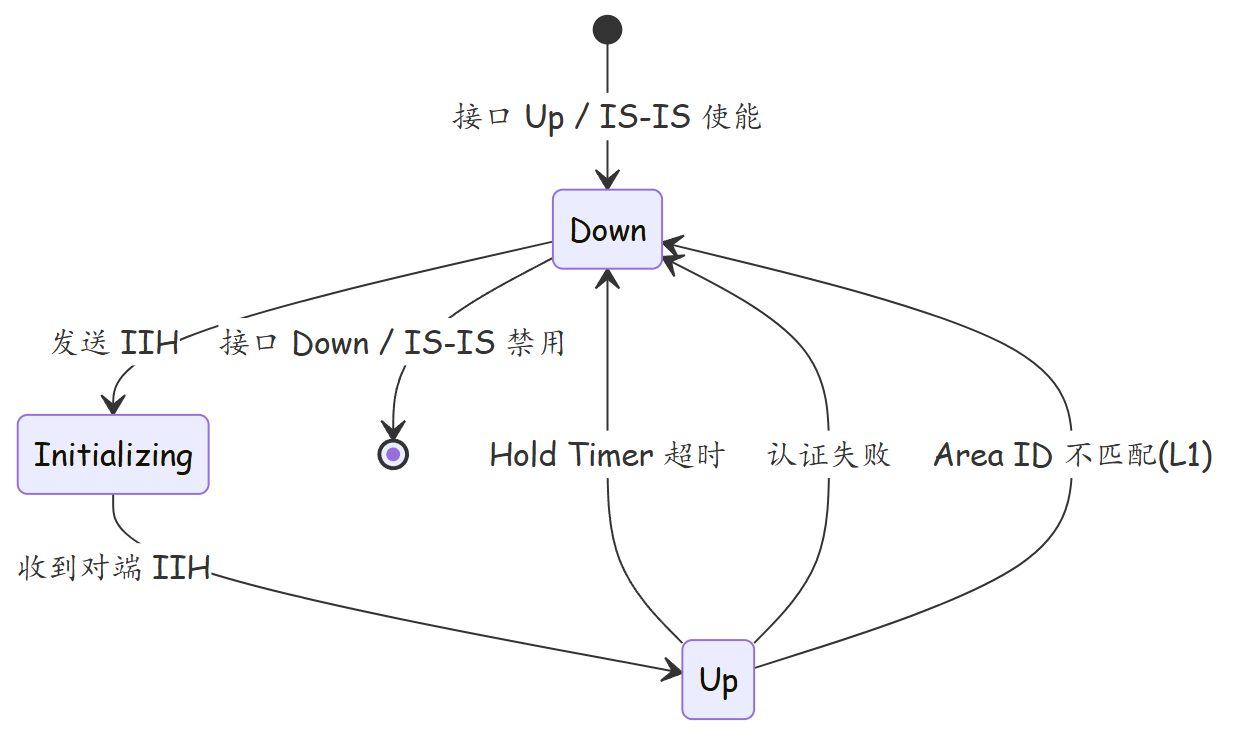
3.2 Level-1 邻居建立条件详解
Level-1 邻居要求严格,需要满足:
- 双方接口的 IS-IS circuit-level 包含 Level-1
- 双方的 Area ID 完全一致(NET 中的 Area 部分相同)
- System ID 不同
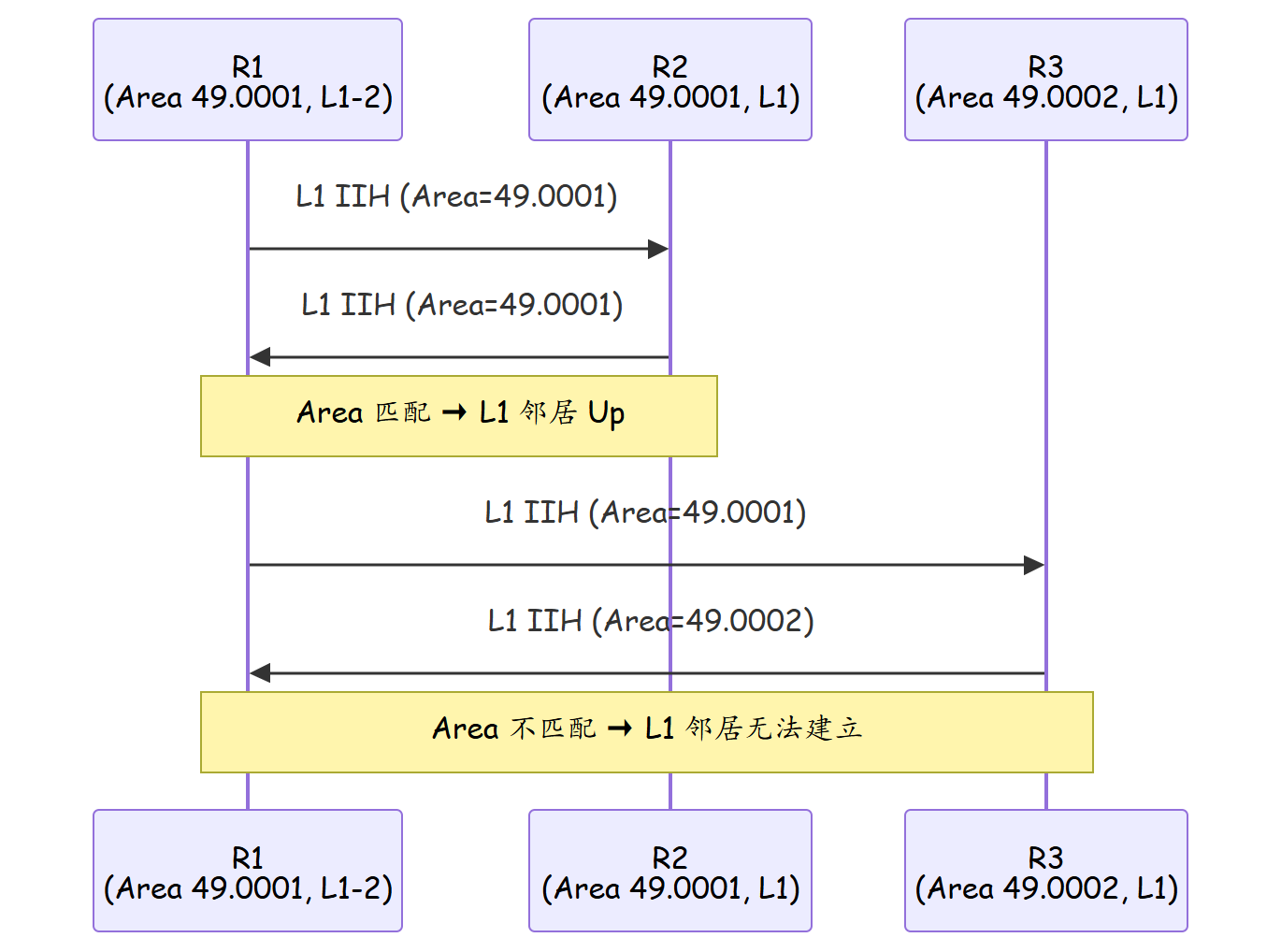
3.3 Level-2 邻居建立条件详解
Level-2 邻居不检查 Area ID,只要求:
- 双方接口的 IS-IS circuit-level 包含 Level-2
- System ID 不同
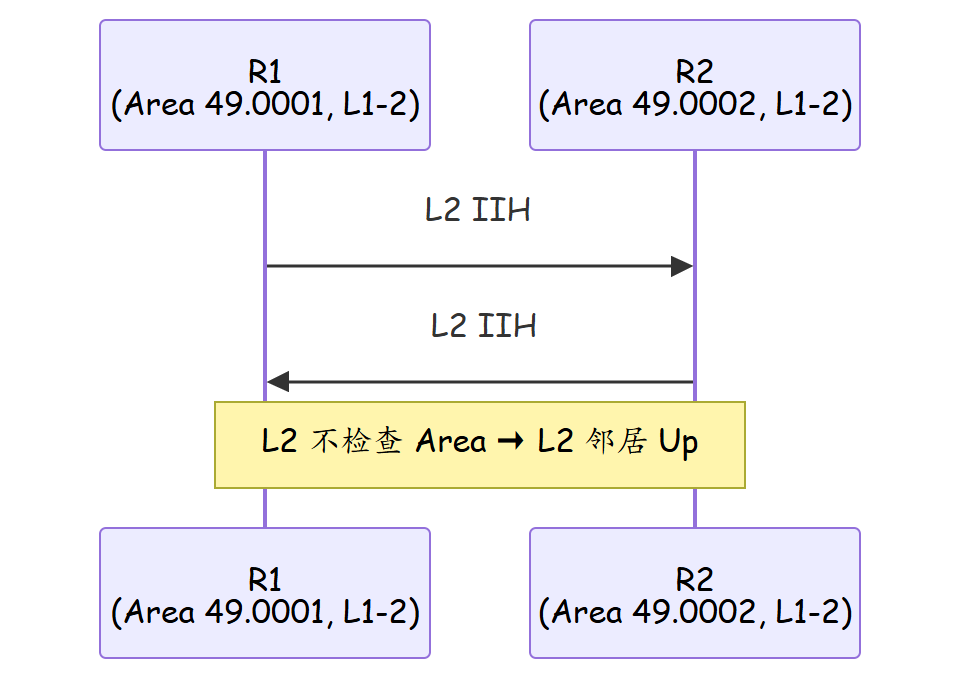
3.4 邻居建立的 IIH 检查项
接收 IIH 时,路由器会检查以下字段:
| 检查项 | Level-1 | Level-2 | 动作 |
|---|---|---|---|
| 自身 System ID 出现在 IIH 邻居列表中 | 接受 | 接受 | 正常 |
| Area ID 匹配 | 必须 | 不检查 | 不匹配则丢弃(L1) |
| Holding Time > 0 | 是 | 是 | 否则邻居 Down |
| 认证通过 | 是 | 是 | 否则丢弃 |
| PDU 长度 ≤ MTU | 是 | 是 | 否则丢弃 |
四、实战配置/案例分析
4.1 基本邻居配置
# R1 配置
sysname R1
isis 1
 net 49.0001.0000.0000.0001.00
#
interface GigabitEthernet0/0/0
 ip address 10.1.0.1 30
 isis enable 1
 isis circuit-level level-1-2

# R2 配置
sysname R2
isis 1
 net 49.0001.0000.0000.0002.00
#
interface GigabitEthernet0/0/0
 ip address 10.1.0.2 30
 isis enable 1
 isis circuit-level level-1-2
4.2 配置认证
# 接口认证(最简单的方式)
interface GigabitEthernet0/0/0
 isis authentication-mode simple-cipher Huawei@123

# 域认证
isis 1
 authentication-mode simple-cipher Huawei@123

# LSP 认证
isis 1
 authentication-mode lsp simple-cipher Huawei@123
4.3 案例分析:Area ID 不匹配导致 L1 邻居无法建立
故障背景:R1 和 R2 直连,R1 为 Level-1-2(Area 49.0001),R2 为 Level-1(Area 49.0002)。
排查:
# R1 和 R2 的邻居表
<R1> display isis peer
 Total Peer Count     : 0     # 无邻居

# 调试信息
isis 1
 debugging isis packet
#
*Sep  1 16:00:00 R1 %%%% ISIS: Receive L1 IIH from 0000.0000.0002
  Area ID mismatch (Local: 49.0001, Remote: 49.0002)
根因:Level-1 邻居要求 Area ID 一致。R1 的 Area 为 49.0001,R2 的 Area 为 49.0002,L1 IIH 被丢弃。
修复:
# 方式1:统一 Area ID
# R2
isis 1
 net 49.0001.0000.0000.0002.00   # 修改 Area 为 49.0001

# 方式2:将 R2 改为 Level-2(如果不需要 L1 路由)
# R2
interface GigabitEthernet0/0/0
 isis circuit-level level-2      # 仅建立 L2 邻居
4.4 案例分析:MTU 不匹配导致邻居反复震荡
故障背景:R1 和 R2 的 IS-IS 邻居反复 Up/Down。
排查:
# R1 接口 MTU
<R1> display interface GigabitEthernet0/0/0
  Current send queue depth is 0
  MTU : 1500 bytes

# R2 接口 MTU
<R2> display interface GigabitEthernet0/0/0
  MTU : 9000 bytes

# IS-IS 日志
*Sep  1 16:30:00 R1 %%%-0262042 IsIsNeighborStateChange[l2]
  The state of IS-IS neighbor changed to Down.
  Reason: LSP too long
根因:R2 的 CSNP 报文因 LSDB 较大,超过了 R1 接口的 MTU(1500 字节),R1 丢弃了该报文,导致 Hold Timer 超时。
修复:
# 方案1:统一 MTU(推荐)
# R1
interface GigabitEthernet0/0/0
 mtu 9000

# 方案2:忽略 MTU 不匹配(应急)
# R1
isis 1
 isis mtu-ignore
4.5 案例分析:认证配置不一致
故障背景:R1 和 R2 之间邻居无法建立,链路和 IP 配置均正常。
排查:
# R1 接口认证
<R1> display this interface GigabitEthernet0/0/0
 isis authentication-mode simple-cipher Pass1234

# R2 接口无认证
<R2> display this interface GigabitEthernet0/0/0
 # 未配置认证
根因:R1 配置了接口认证,但 R2 未配置,导致 R2 发送的未认证 IIH 被 R1 丢弃。
修复:
# R2 配置相同认证
interface GigabitEthernet0/0/0
 isis authentication-mode simple-cipher Pass1234
4.6 案例分析:System ID 冲突
故障背景:R1 发现自己的 LSP 被异常覆盖。
排查:
<R1> display isis lsdb
 # 发现自己的 LSP 序列号被反复刷新
 0000.0000.0001.00-00   SeqNum: 0x00000010 (异常高)

# 排查发现 R2 也配置了相同的 System ID
isis 1
 net 49.0002.0000.0000.0001.00   # System ID = 0000.0000.0001
根因:R1 和 R2 使用了相同的 System ID(0000.0000.0001),导致 LSP 冲突。
修复:
# R2 修改 System ID
isis 1
 net 49.0002.0000.0000.0002.00
五、总结
| 条件 | Level-1 要求 | Level-2 要求 |
|---|---|---|
| Area ID 一致 | 必须 | 不要求 |
| Level 兼容 | 含 L1 | 含 L2 |
| System ID 唯一 | 必须 | 必须 |
| MTU 兼容 | 必须 | 必须 |
| 认证匹配 | 配置时必须 | 配置时必须 |
| 常见故障 | 排查方法 |
|---|---|
| 邻居数为 0 | 检查 IS-IS 使能、IP 连通性 |
| L1 邻居无法建立 | 检查 Area ID 是否一致 |
| L2 邻居无法建立 | 检查 circuit-level 配置 |
| 邻居反复震荡 | 检查 MTU、认证、Hello 间隔 |
| LSP 泛洪失败 | 检查 MTU、Level 匹配 |
思考
- IS-IS Level-1 邻居要求 Area ID 一致,而 Level-2 不要求。从协议设计角度,为什么有这样的区别?
- 当 IS-IS 邻居反复 Up/Down 时,应该按什么顺序排查?列出你的排查步骤和对应的检查命令。
- IS-IS 的认证可以配置在接口级别、域级别和 LSP 级别。这三种认证级别之间是什么关系?是否同时生效?
下篇预告:第78篇:IS-IS 路由泄露:Level-2 向 Level-1 注入