第152篇:PPPoE 拨号与企业宽带接入
关键词:PPPoE、宽带接入、BRAS、BASC、DHCP、RADIUS、认证计费
一、引言
PPPoE(Point-to-Point Protocol over Ethernet)是将 PPP 协议封装在以太网帧中传输的技术。它解决了传统 PPP 只能运行在点对点物理链路上的限制,使运营商能够在共享的以太网基础设施上实现用户级的认证、授权和计费。PPPoE 是全球宽带接入的核心技术之一,无论是家庭用户的 ADSL/VDSL 接入,还是企业用户的以太网专线,都在使用或借鉴 PPPoE 的机制。
二、核心概念
2.1 PPPoE 工作原理
PPPoE 本质上是在以太网帧和 PPP 帧之间增加了一层封装。它包含两个阶段:发现阶段(Discovery)和会话阶段(Session)。
PPPoE 帧格式:
| 字段 | 长度 | 说明 |
|---|---|---|
| DA(目的MAC) | 6字节 | 发现阶段使用组播,会话阶段使用单播 |
| SA(源MAC) | 6字节 | 客户端 MAC 地址 |
| Ethertype | 2字节 | 0x8863(发现)/ 0x8864(会话) |
| Version | 4位 | 协议版本(当前为1) |
| Type | 4位 | 固定为1 |
| Code | 1字节 | 报文类型代码 |
| Session ID | 2字节 | 会话标识 |
| Length | 2字节 | PPP 载荷长度 |
| PPP Payload | 可变 | LCP/NCP 或数据 |
2.2 PPPoE 发现阶段四步握手
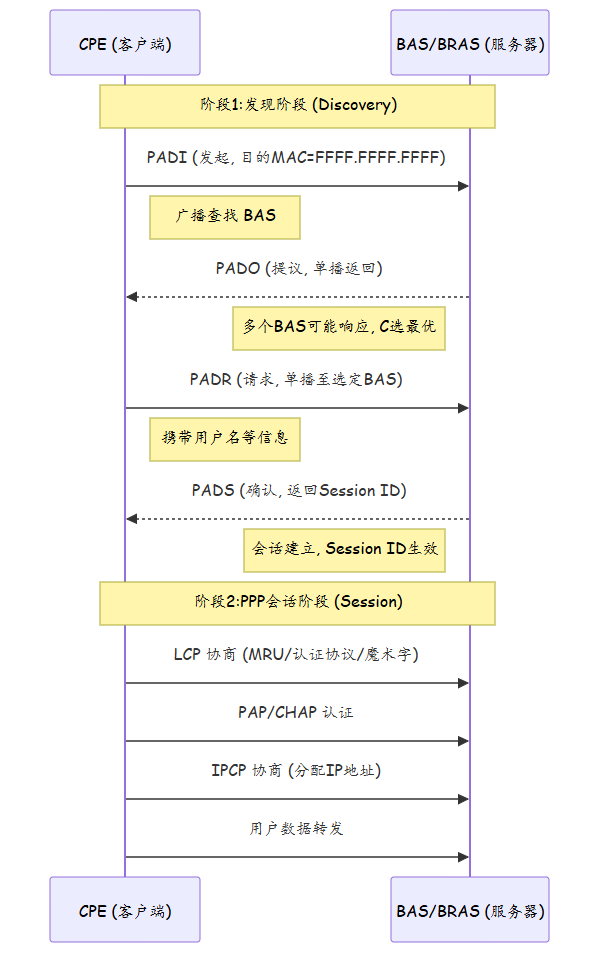
2.3 BRAS(Broadband Remote Access Server)
BRAS 是宽带远程接入服务器,作为 PPPoE 的终结点,承担以下核心功能:
| 功能模块 | 说明 |
|---|---|
| PPPoE 终结 | 接收并终结 PPPoE 会话,提取 PPP 载荷 |
| 认证授权 | 与 RADIUS 服务器交互,验证用户身份 |
| IP 地址分配 | 通过 IPCP 为客户端分配 IP 地址 |
| 计费功能 | 实时计费/离线计费,统计流量数据 |
| QoS 策略 | 基于用户等级的带宽限速、优先级标记 |
| 策略控制 | 访问控制列表、URL 过滤、应用识别 |
三、技术细节
3.1 PPPoE 会话状态机
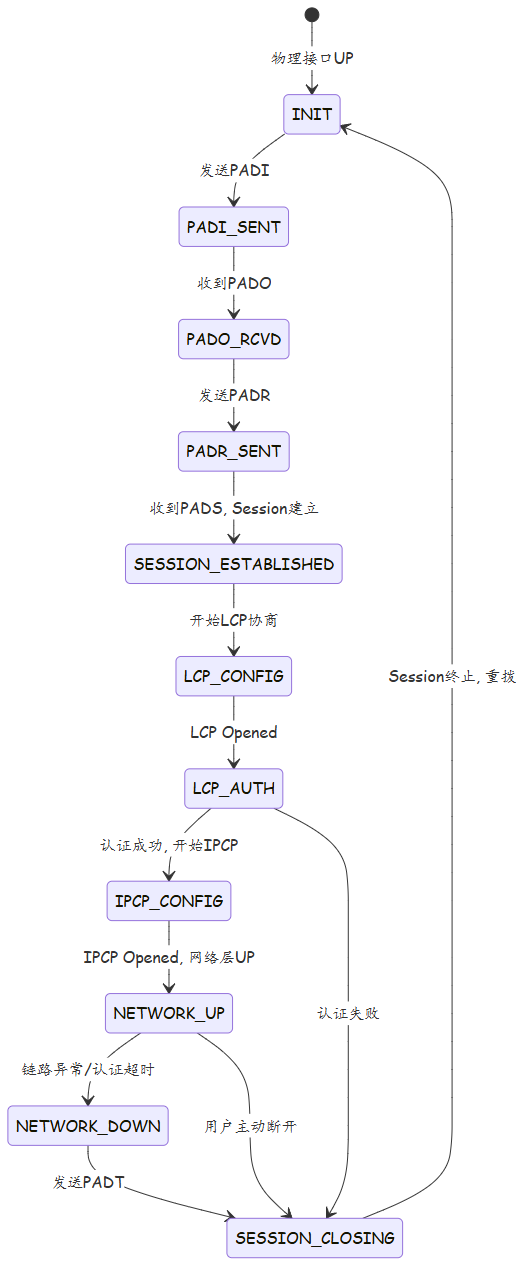
3.2 认证方式对比
| 认证方式 | 流程 | 安全性 | 应用场景 |
|---|---|---|---|
| PAP | 明文密码发送 | 低 | 不推荐 |
| CHAP | 三次握手哈希验证 | 中 | 常用 |
| MS-CHAPv2 | 微软扩展CHAP | 中高 | Windows域环境 |
| EAP | 可扩展认证框架 | 高 | 802.1X集成 |
| RADIUS+Token | 动态令牌认证 | 高 | 企业高安全场景 |
3.3 DHCP 与 PPPoE 的选择对比
运营商网络中,IP 地址分配有两种主流方案:DHCP 方式和 PPPoE 方式。
| 对比维度 | DHCP 方式 | PPPoE 方式 |
|---|---|---|
| 用户标识 | MAC地址/Option82 | PPPoE用户名 |
| 认证粒度 | 端口级/设备级 | 用户级 |
| IP地址分配 | DHCP服务器 | BRAS通过IPCP |
| 计费精度 | 较低(端口维度) | 较高(用户维度) |
| 漫游能力 | 差 | 好(用户名不变) |
| 配置复杂度 | 简单 | 较复杂 |
| 典型场景 | 小区汇聚/FTTH | 家庭宽带/企业专线 |
3.4 企业 PPPoE 专线组网
在企业宽带场景中,PPPoE 不仅用于家庭用户,也广泛用于中小企业的互联网接入。典型方案包括:
- 单线路 PPPoE:CPE 拨号接入 BRAS,获取公网 IP
- 多线路负载均衡:多条 PPPoE 链路,基于会话或地址哈希分流
- 主备 PPPoE:主线路拨号,备用线路热备份
- PPPoE + 静态路由:部分业务走 PPPoE 隧道,部分走静态路由
四、实战配置/案例分析
4.1 华为 MA5800 接入侧 PPPoE 配置
# OLT 侧配置:创建 PPPoE 透传业务流

<MA5800> system-view
[MA5800] otpa profile add 1 pppoe
[MA5800-otpa1] description pppoe-profile
[MA5800-otpa1] quit

# 绑定 PON 端口业务模板
[MA5800] port 0/1
[MA5800-GPON0_1] add ont 0 0 sn-auth 000000000001
[MA5800-GPON0_1] ont 0 0
[MA5800-GPON0_1-0_0] ont-lineport 0 gpon 0 0
[MA5800-GPON0_1-0_0] bind service-port 0 to 1 otpa-profile 1

# 配置 Service Port 透传 PPPoE
[MA5800] service-port 0 inline-classification pppoe-payload vlan 100 multi-service
[MA5800] interface gpon 0/1
[MA5800-GPON0_1] ont-port 0 0 0
[MA5800-GPON0_1-0_0_0] service-port 0
4.2 华为 MA5600T BRAS 侧 PPPoE 配置
# BRAS 侧:PPPoE 终结 + RADIUS 认证 + 地址池分配

<MA5600T> system-view
[MA5600T] domain example.com
[MA5600T-domain-example.com] authenticate authorization radius scheme radius_auth
[MA5600T-domain-example.com] authenticate accounting radius scheme radius_acct

# 配置 RADIUS 服务器
[MA5600T] radius-server template radius_primary
[MA5600T-radius-radius_primary] radius-server authentication 10.1.1.100 1812 primary cipher Huawei@123
[MA5600T-radius-radius_primary] radius-server accounting 10.1.1.100 1813 primary cipher Huawei@123

# 配置地址池
[MA5600T] ip pool broadband
[MA5600T-ipPool-broadband] network 10.10.0.0 mask 255.255.0.0
[MA5600T-ipPool-broadband] gateway-interface LoopBack 1
[MA5600T-ipPool-broadband] dns primary 8.8.8.8

# 配置 PPP 模板
[MA5600T] ppp local-name user@broadband
[MA5600T-ppp] ip pool broadband
[MA5600T-ppp] default ip pool broadband
[MA5600T-ppp] domain example.com
[MA5600T-ppp] idle-time 60

# 配置 BAS 接口
[MA5600T] interface Bundle-Ether 1
[MA5600T-Bundle-Ether1] bas-interface
[MA5600T-Bundle-Ether1-bas] ip pool broadband
[MA5600T-Bundle-Ether1-bas] pppoe-enable
[MA5600T-Bundle-Ether1-bas] user-bind enable
[MA5600T-Bundle-Ether1-bas] domain example.com
4.3 故障排查案例:PPPoE 拨号认证失败
故障现象:某企业用户报告 PPPoE 拨号超时,CPE 日志显示持续收到 PADT(Terminate)报文。
排查过程:
# Step 1: 在 BRAS 上查看 PPPoE 会话状态
<MA5600T> display pppoe-session interface Bundle-Ether 1
Total session number: 1523
Session on interface Bundle-Ether1: 45

# Step 2: 查看 RADIUS 认证日志
<MA5600T> display radius accounting-statistics
RADIUS Accounting Statistics:
  Send packets: 15234    Success: 14890    Failed: 344

# Step 3: 检查 RADIUS 可达性
<MA5600T> ping -a 10.1.1.200 10.1.1.100
  10.1.1.100 is pinging, basic information displayed
  Ping statistics for 10.1.1.100:
    Packet: Sent = 5, Received = 5, Lost = 0 (0% loss)

# Step 4: 调试 RADIUS 交互
<MA5600T> debugging radius packet
# 发现 RADIUS 服务器返回 Access-Reject, 错误码为: Invalid Attributes
# 根因: RADIUS 服务器升级后, Option 82 格式不兼容
根因分析:RADIUS 服务器版本升级后,对 NAS-IP-Address 和 Framed-IP-Address 属性的校验策略变更,导致原有用户属性格式不被接受。
解决方案:
1. 在 RADIUS 服务器端更新用户数据库格式
2. 在 BRAS 侧调整 RADIUS 属性映射:radius attribute remap
3. 验证修复:reset pppoe-session interface Bundle-Ether 1 user-name xxx
四(续)、高级主题
4.4 PPPoE 与 VLAN 结合(PPPoE over VLAN)
在企业场景中,PPPoE 经常与 VLAN 结合使用,实现业务隔离:
| 模式 | 封装结构 | 说明 |
|---|---|---|
| 单层 VLAN + PPPoE | Ethernet → VLAN Tag → PPPoE → PPP | 单业务场景 |
| QinQ + PPPoE | Ethernet → S-VLAN → C-VLAN → PPPoE → PPP | 多租户隔离 |
| VLAN Stacking + PPPoE | 多层 VLAN 标签 + PPPoE | 复杂运营商场景 |
# BRAS侧配置PPPoE over VLAN
[MA5600T] interface Bundle-Ether 1.100
[MA5600T-Bundle-Ether1.100] vlan 100
[MA5600T-Bundle-Ether1.100] bas-interface
[MA5600T-Bundle-Ether1.100-bas] pppoe-enable
[MA5600T-Bundle-Ether1.100-bas] ip pool broadband-vlan100
[MA5600T-Bundle-Ether1.100-bas] domain example-vlan100.com
4.5 PPPoE 认证计费流程详解
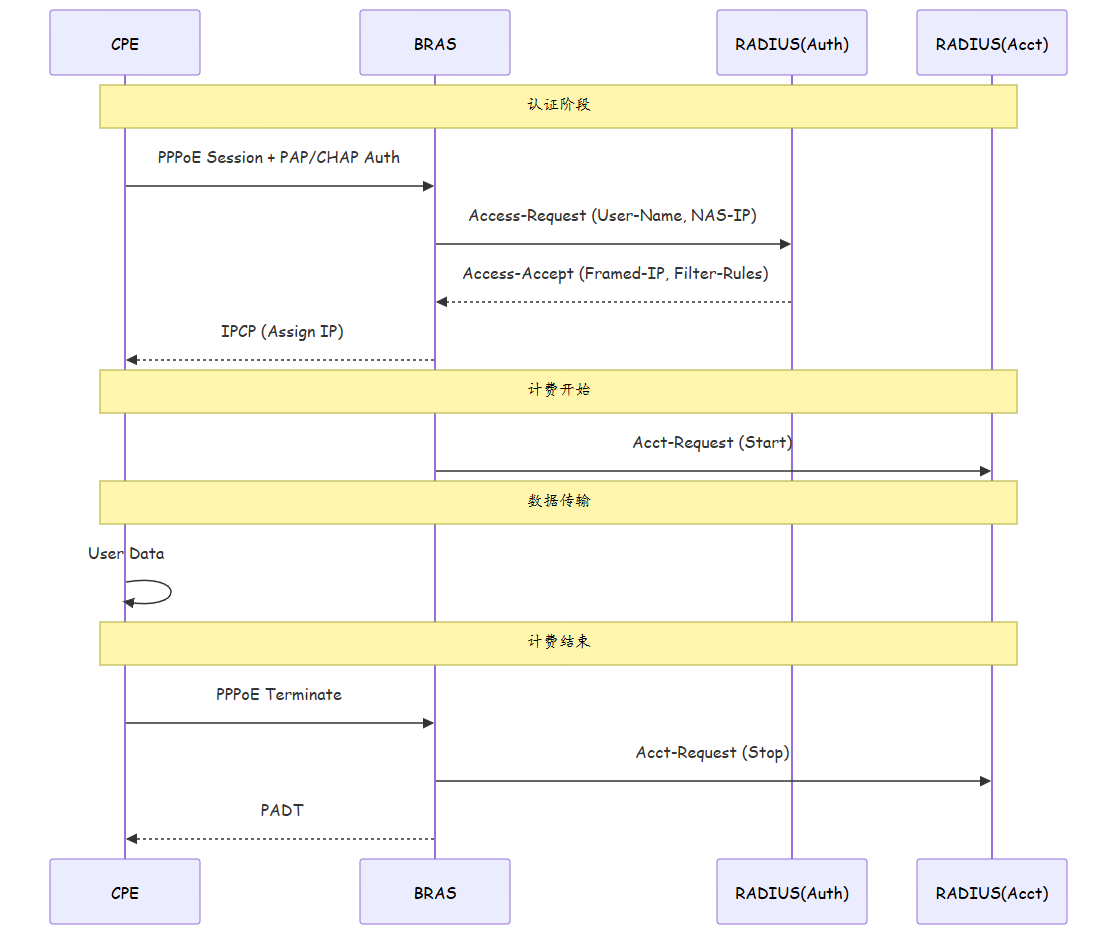
4.6 企业宽带专线 PPPoE 配置模板
# ========== BRAS 完整配置模板 ==========

# 1. 创建域
[BRAS] domain enterprise.com
[BRAS-domain-enterprise.com] authenticate authorization radius scheme radius_ent
[BRAS-domain-enterprise.com] authenticate accounting radius scheme radius_ent_acct

# 2. 配置RADIUS
[BRAS] radius-server template radius_ent
[BRAS-radius-radius_ent] radius-server authentication 10.1.1.100 1812 primary cipher Huawei@123
[BRAS-radius-radius_ent] radius-server accounting 10.1.1.100 1813 primary cipher Huawei@123
[BRAS-radius-radius_ent] radius-server vsn 10.1.1.101 primary cipher Huawei@123

# 3. 地址池
[BRAS] ip pool enterprise-pool
[BRAS-ipPool-enterprise-pool] network 10.20.0.0 mask 255.255.0.0
[BRAS-ipPool-enterprise-pool] gateway-ip 10.20.0.1
[BRAS-ipPool-enterprise-pool] dns primary 8.8.8.8 secondary 8.8.4.4
[BRAS-ipPool-enterprise-pool] lease time unlimited

# 4. AAA方案
[BRAS] aaa
[BRAS-aaa] authentication-scheme radius_ent
[BRAS-aaa] authorization-scheme radius_ent
[BRAS-aaa] accounting-scheme radius_ent_acct

# 5. BAS接口
[BRAS] interface Bundle-Ether 10
[BRAS-Bundle-Ether10] bas-interface
[BRAS-Bundle-Ether10-bas] pppoe-enable
[BRAS-Bundle-Ether10-bas] ip pool enterprise-pool
[BRAS-Bundle-Ether10-bas] domain enterprise.com
[BRAS-Bundle-Ether10-bas] user-bind enable
[BRAS-Bundle-Ether10-bas] ppp max-session 100
4.7 PPPoE 会话调试命令速查
| 场景 | 命令 | 说明 |
|---|---|---|
| 查看活跃会话 | display pppoe-session interface Bundle-Ether 1 |
列出所有活跃拨号 |
| 查看用户详情 | display pppoe-session user-name xxx |
单个用户会话详情 |
| 重置会话 | reset pppoe-session user-name xxx |
强制断开并重拨 |
| 调试 PADI/PADO | debugging pppoe packet discovery |
捕获发现阶段报文 |
| 调试 PPP 认证 | debugging ppp authentication |
捕获 PAP/CHAP 交互 |
| 查看 RADIUS 统计 | display radius accounting-statistics |
RADIUS 收发包统计 |
| 查看地址池 | display ip pool enterprise-pool |
地址池使用率 |
五、总结
| 项目 | 要点 |
|---|---|
| PPPoE 本质 | 在以太网上运行 PPP,实现用户级认证和 IP 分配 |
| 两阶段 | Discovery(发现,4步握手) + Session(PPP会话,含LCP/认证/NCP) |
| BRAS 角色 | PPPoE 终结 + 认证代理 + 地址分配 + 计费采集 |
| 认证体系 | PAP(明文)< CHAP(哈希)< EAP(可扩展),企业推荐使用 CHAP 或 EAP |
| 选型考量 | PPPoE 适合需用户级管理场景,DHCP 适合简单接入场景 |
思考
- PPPoE 发现阶段为什么使用组播而不是单播?如果在网络中存在多个 BRAS 响应 PADI,CPE 如何选择?
- PPPoE 会话中如果 CHAP 认证失败,会话会被立即终止还是可以重试?重试机制是怎样的?
- 企业专线使用 PPPoE 接入相比静态路由方案,优势和劣势分别是什么?
下篇预告:第153篇:MPLS 基本概念:标签、LSP、FEC